Plug Seller Features

Plug Seller is for sellers who source products to resell on Amazon, Walmart and eBay, whether that is retail arbitrage, online arbitrage or wholesale. You find a product, and Plug Seller tells you if it meets your profit and ROI targets, what it costs you in fees, how fast it sells, and whether your own account can list it.

It does that in a few seconds, and it works the same in the web app, the Chrome extension and the mobile app.

3-day free trialNot charged during the trialCancel anytime

3 tools, 1 account

With the web app, the Chrome extension and the mobile app, you get the same analysis wherever you find the product.

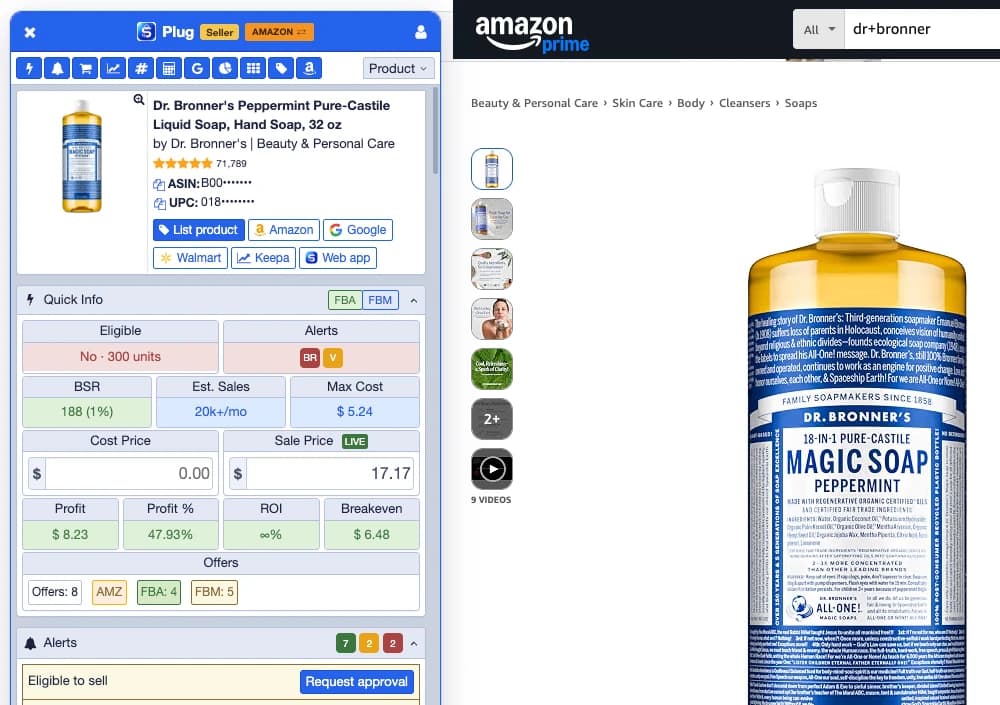
The Plug Seller extension panel open next to an Amazon product page, showing the product, Quick Info and the first alerts
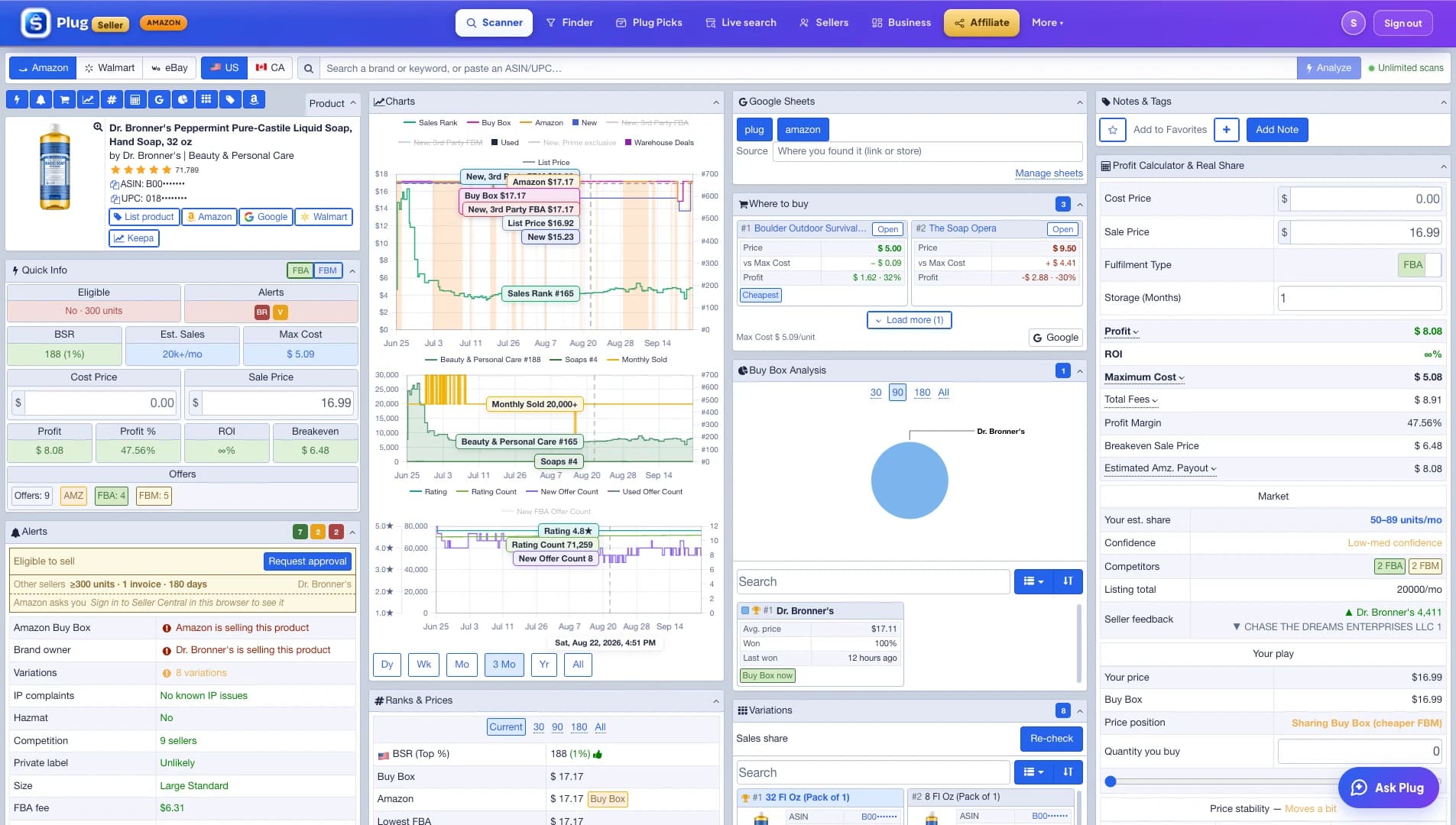
The Plug Seller web app analyzing a product: the product card, Quick Info, the Alerts, the charts, Ranks & Prices, Google Sheets, Where to buy, Buy Box Analysis, Variations, Notes & Tags and the Profit Calculator & Real Share panel, on one screen
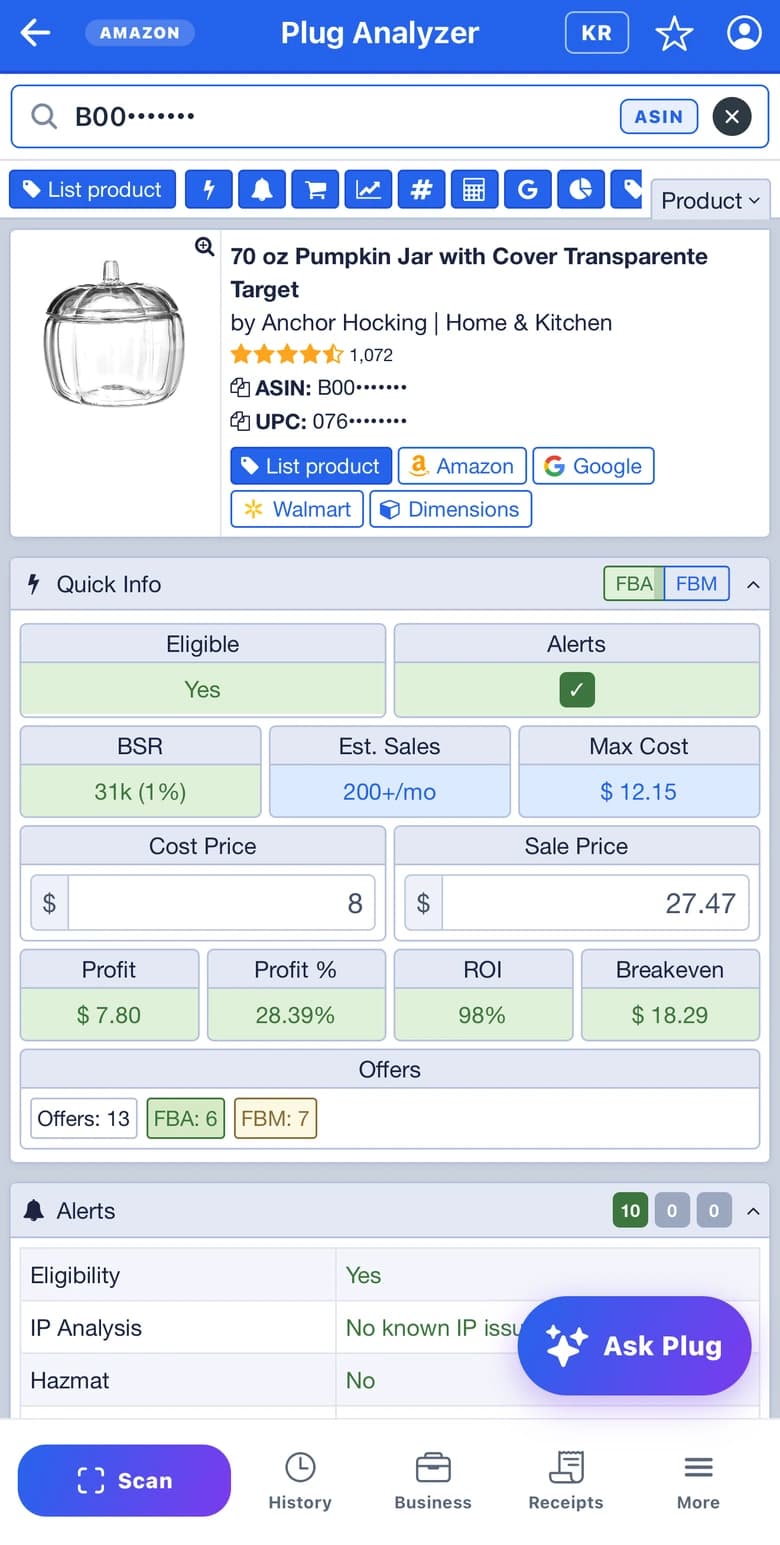
The mobile app's analysis of a scanned product: the product card, Quick Info with the profit and ROI, and the alerts

Web app

The whole analysis on one screen: a scan lays its panels out in columns, and Advanced Search, Plug Picks, Live search, Ungating, My Business and your settings are one tab away.

Chrome extension

Side by side with the product page:open a product on Amazon, Walmart or eBay and the panel opens next to it. On any other store's website, one click finds the product on Amazon and uses the page's price as your cost.

Mobile app

On the go, for iPhone, iPad and Android: point the camera at a barcode and the analysis opens. For a product with no barcode, take a photo and the app finds it.

Same email and password everywhere.Chrome Web StoreApp StoreGoogle Play

Find products

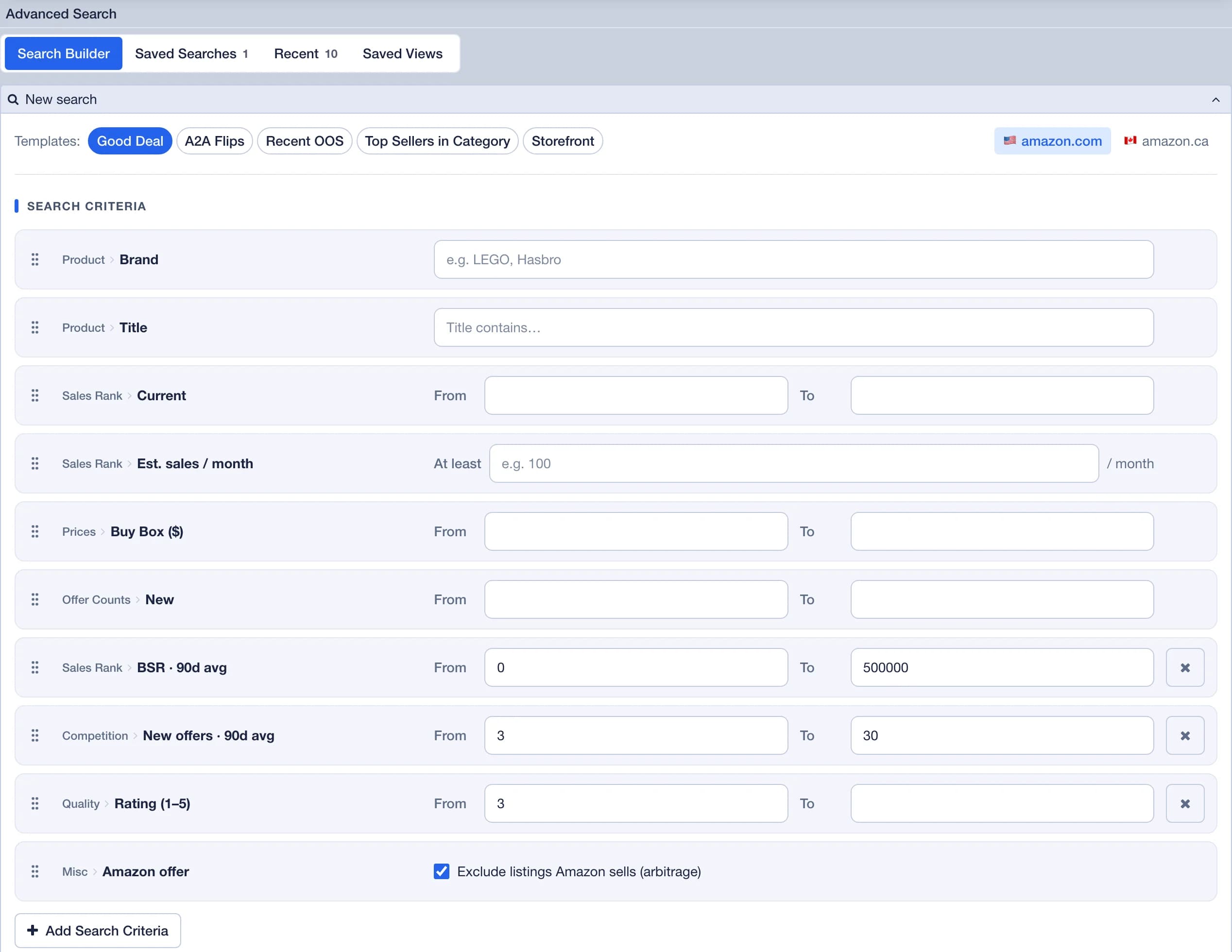
Search the catalog with your own filters, take a deal that is already worked out, or let a scan of a whole store do the digging. Then check what your account can sell before you pay for it.

Plug Picks

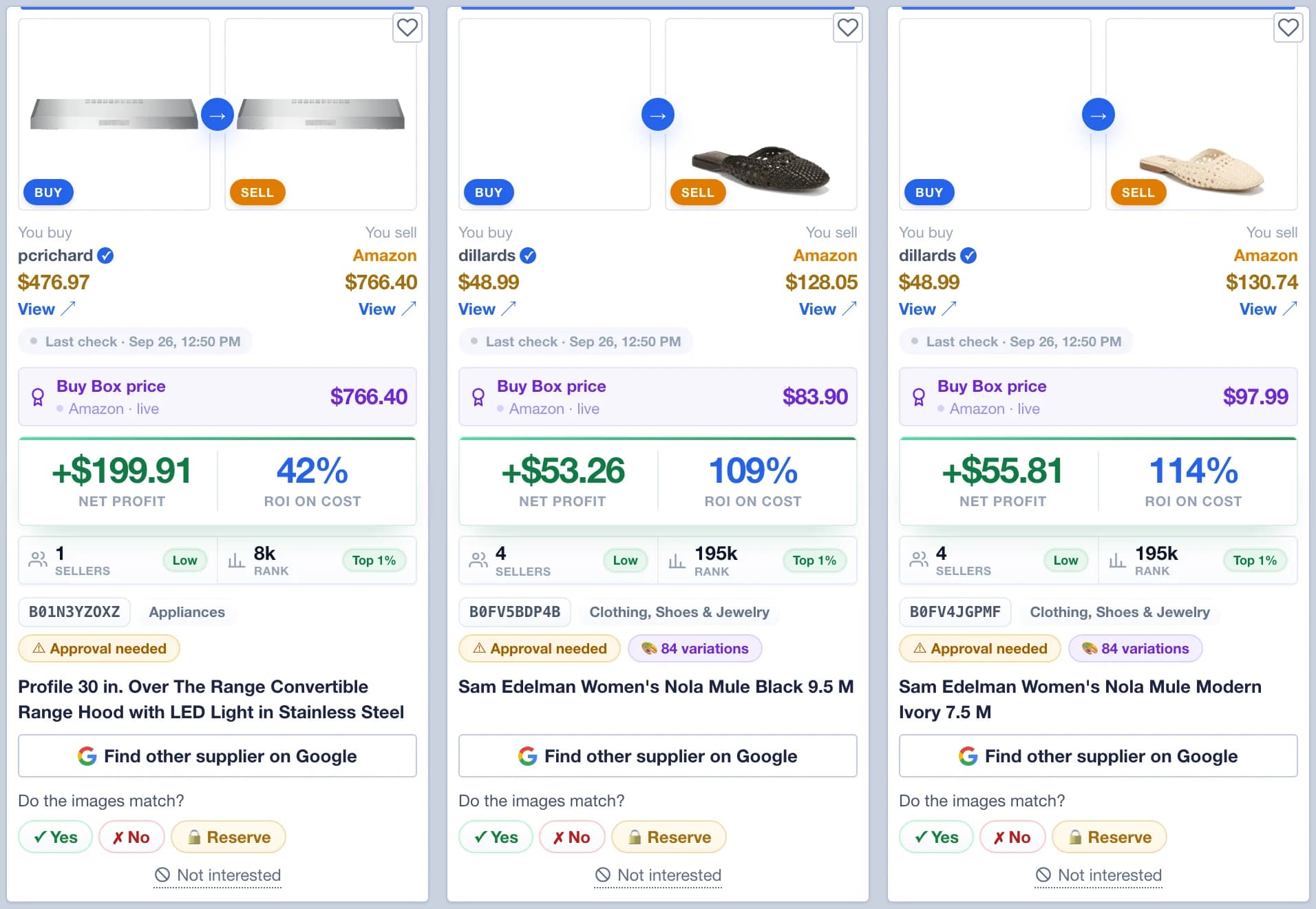
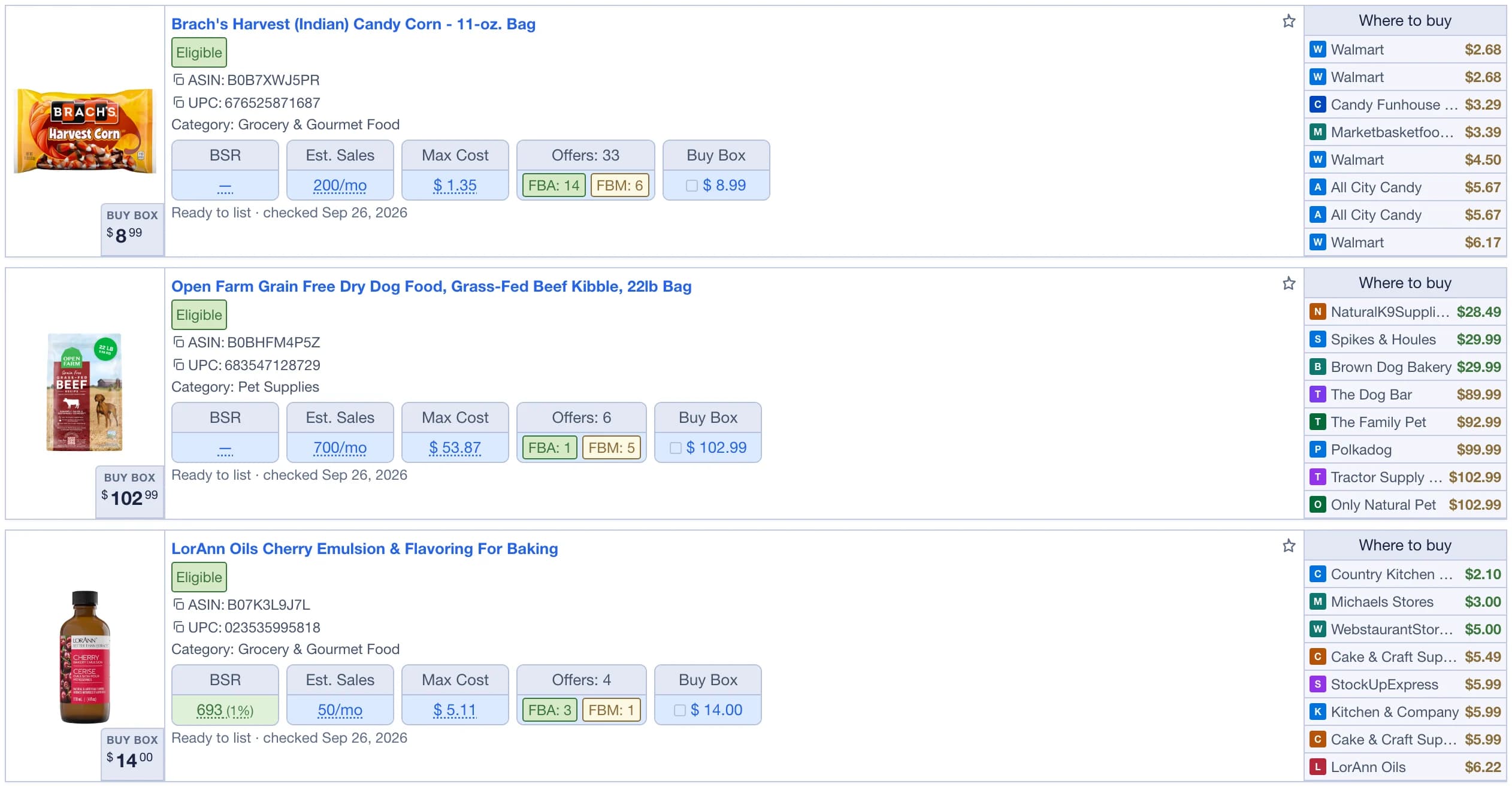
Plug Picks are ready-made flip deals. Each one tells you where to buy the product, where to sell it, and what it should make. New picks come in every day.

  • You buy shows the store and its price. A check mark means a verified supplier.
  • You sell shows Amazon or Walmart, with the Buy Box price, the net profit and the ROI on cost.
  • Estimated sales, the number of sellers and the rank, plus Eligible, Approval needed or Restricted for your own account.
  • Filter by category, store, buy price, sale price, ROI, BSR or sellers. Sort by newest, highest ROI, most sales or fewest sellers.
  • Pro sees each new pick 24 hours early, and Reserve takes a pick off every other member's list for 1 to 3 months.

Included with Combo and Pro.

Learn more
Three Plug Picks cards: the store to buy from and the Amazon listing to sell on, the last check, the Buy Box price, the net profit and the ROI on cost, the sellers and rank, and the eligibility badge

Ask Plug

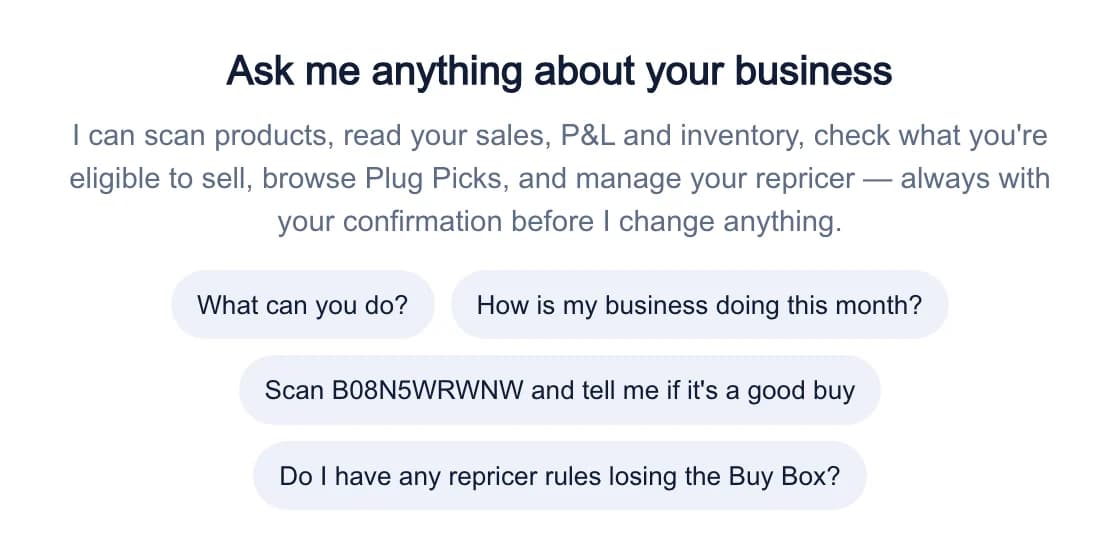
Ask Plug is the assistant built into Plug Seller. Press Ask Plug at the bottom right of any page, or open it in the mobile app, and ask in plain words.

  • Scan a product, or go through an analysis with you.
  • Find suppliers, and check whether you can sell a product.
  • Look for products across Amazon, Walmart and eBay, and email you the results on a schedule.
  • Read the files and photos you attach, or listen to your voice.
  • Before it does anything for you, it asks you to Confirm this action.

Included with Combo and Pro once the free trial is over.

Learn more
Ask Plug in the web app, open on a new conversation with the things you can ask it

Plug Ungating

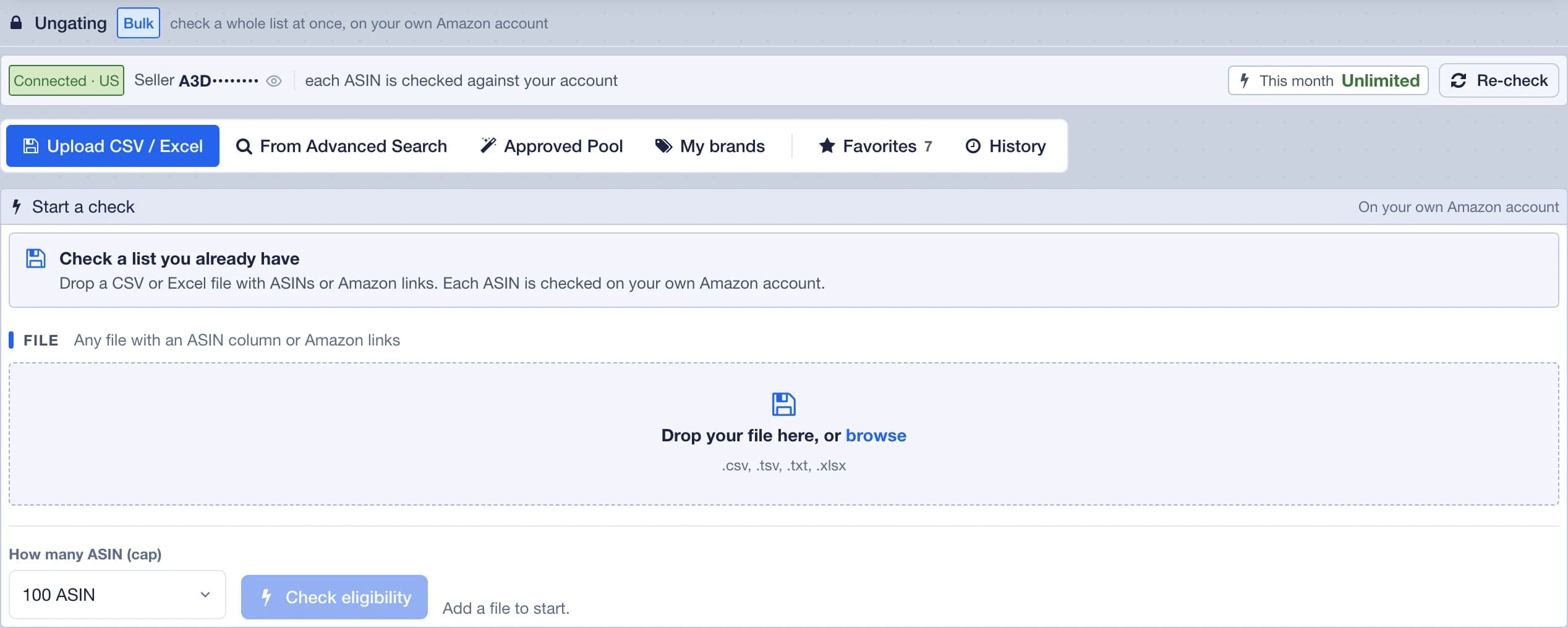
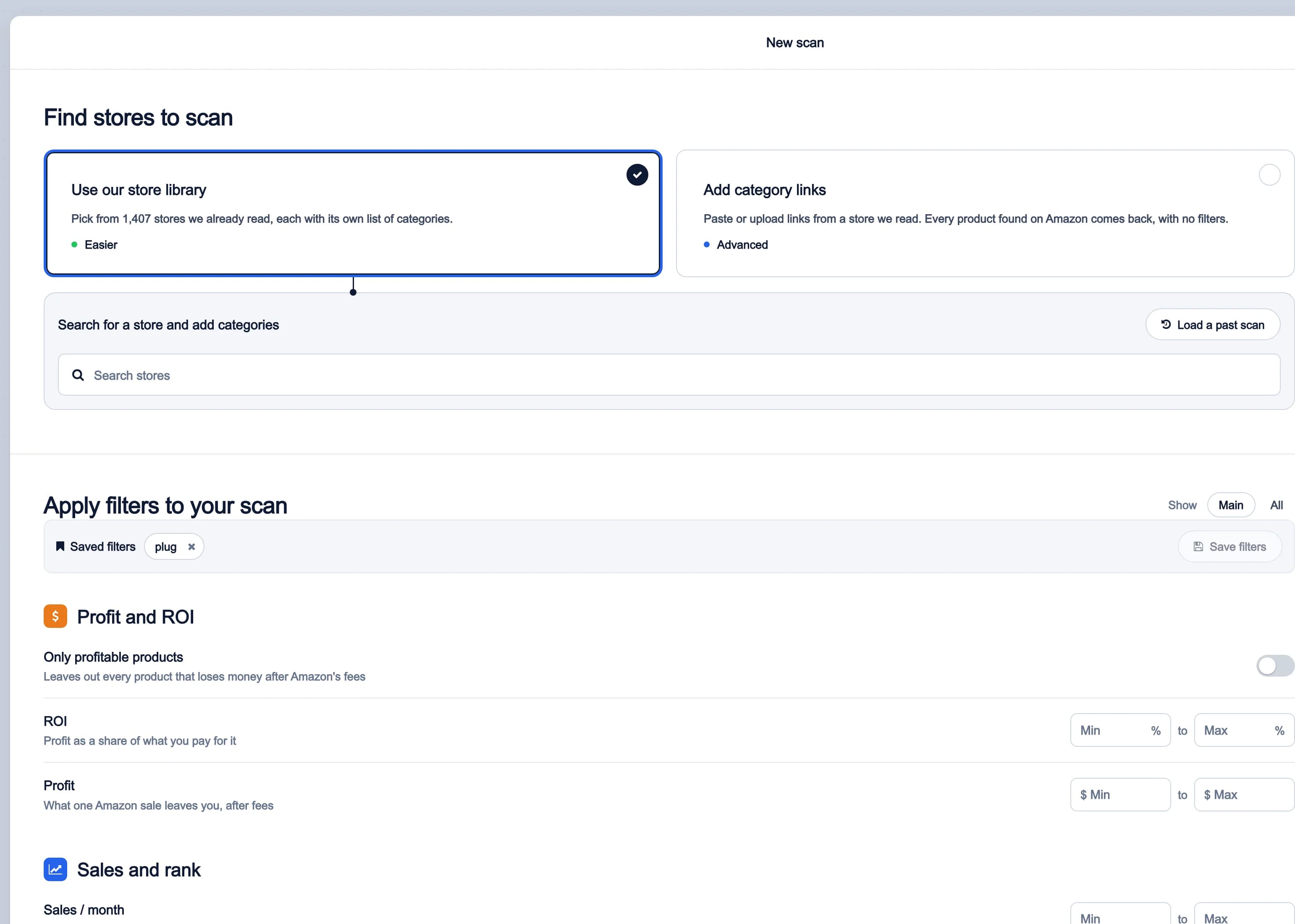
Plug Ungating asks Amazon about a whole list of products at once, on your own account, and sorts the answers into Eligible, Need approval and Restricted.

  • Upload CSV / Excel with an ASIN column or Amazon links, up to 10 MB. A Keepa export works as it is.
  • From Advanced Search checks every product that matches your filters. Approved Pool checks the products other members can sell, on your account.
  • Every row has Amazon's own reason and a request approval link that opens Seller Central.
  • A check keeps running if you close the page, and History keeps everything you have ever checked.
  • 100 runs a month of up to 150 ASINs on Combo. Unlimited runs of up to 1,000 ASINs on Pro.

Included with Combo and Pro.

Learn more
Plug Ungating: the connected Amazon account, the tabs Upload CSV / Excel, From Advanced Search, Approved Pool, My brands, Favorites and History, and the Start a check panel with the file drop zone and the ASIN capPlug Ungating's History tab: products checked on the seller's own account, each with its Eligible result, the rank, estimated sales, Max Cost and offers

My brands

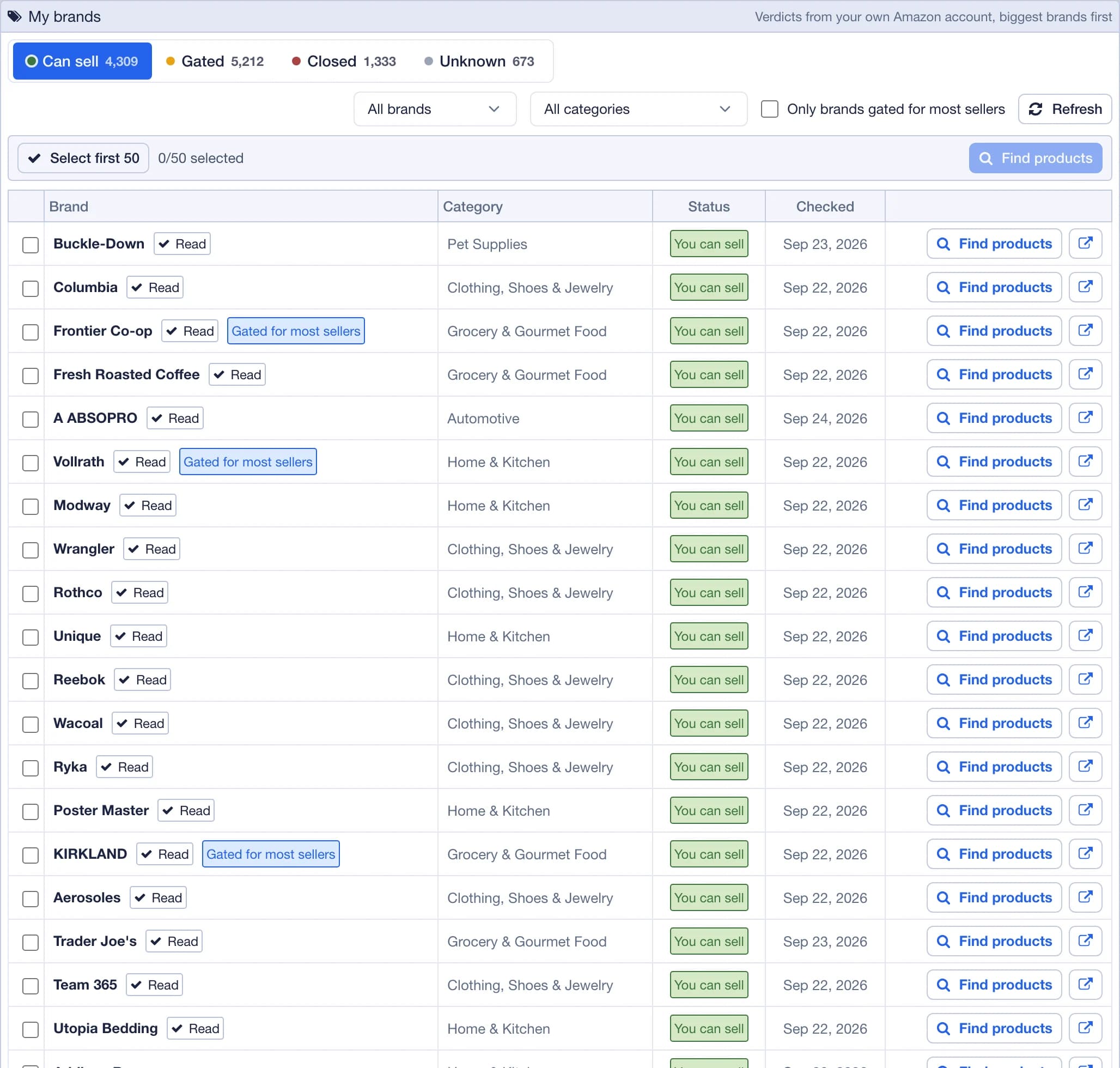
My brands checks every brand in the Amazon categories you pick, on your own account, and tells you which ones you can sell.

  • Each category tile shows how many brands it holds, and once it's checked, how many of them you can sell.
  • Press Check N brands and it runs in the background. Come back whenever you like.
  • Every brand comes back as Can sell, Gated, Closed or Unknown, biggest brands first.
  • On Can sell, tick up to 50 brands and press Find products to check their products.
  • Brands you checked in the last 30 days are skipped, so a repeat check goes faster.

Included with Pro, and the Pro free trial includes it.

Learn more
My brands: the brands of the picked categories sorted into Can sell, Gated, Closed and Unknown, biggest brands first, with a Find products button on each

One scan, every number

Type a keyword, an ASIN or a UPC in the Scanner, or open the product page with the extension. The panels below are on the screen in seconds, and it is the same read in the web app, the extension and the app.

plugseller.com/scan
The Plug Seller web app analyzing a product: the product card, Quick Info, the Alerts, the charts, Ranks & Prices, Google Sheets, Where to buy, Buy Box Analysis, Variations, Notes & Tags and the Profit Calculator & Real Share panel, on one screen

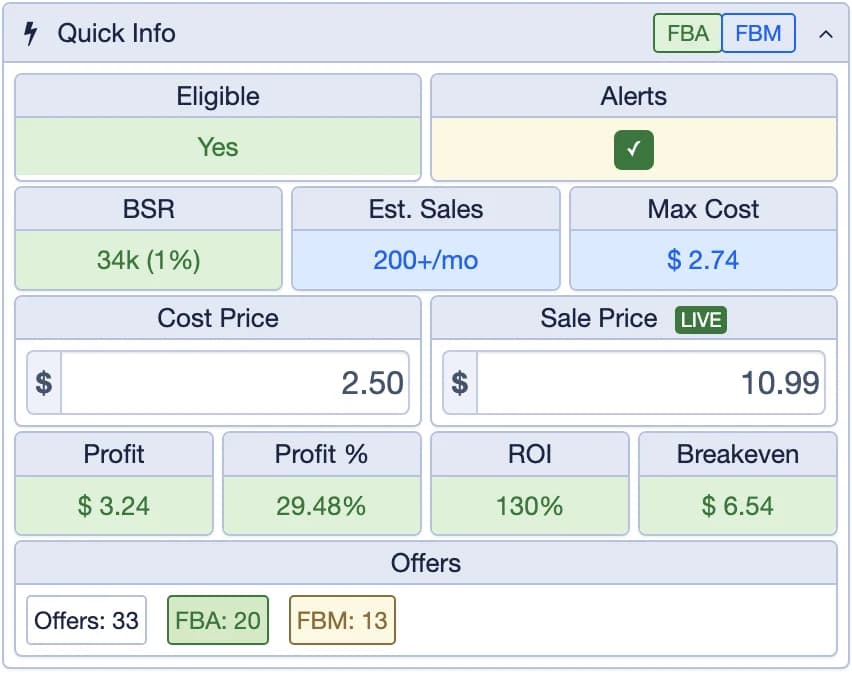
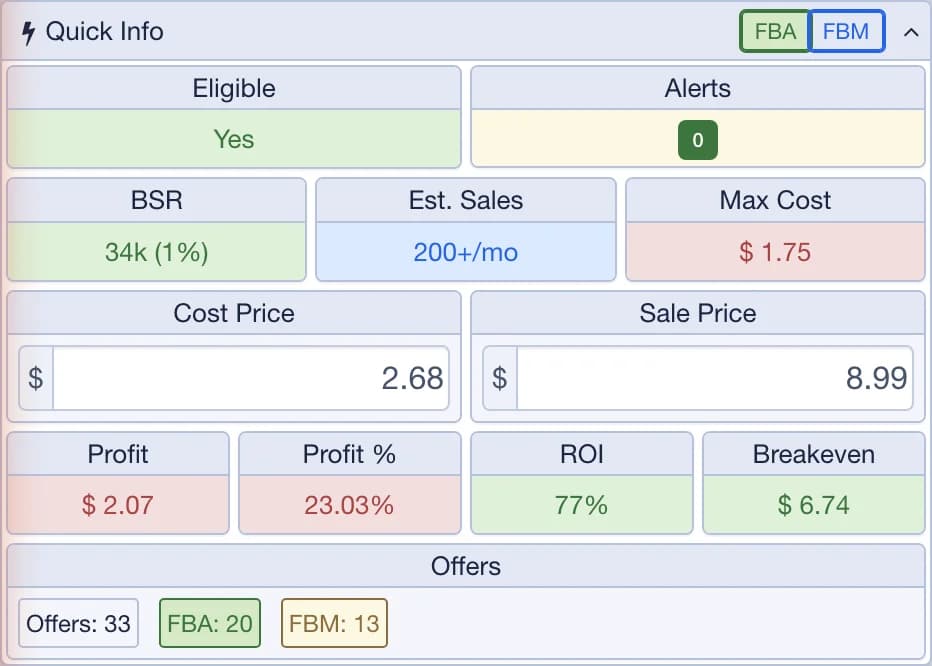
Quick Info

The first panel on every scan. Enter your Cost Price and the whole row recalculates.

  • Eligible and Alerts, the BSR with its top % in the category, Est. Sales and Max Cost.
  • Max Cost is the most you can pay and still reach your minimum ROI and profit, after every fee.
  • Cost Price and Sale Price, then Profit, Profit %, ROI and Breakeven.
  • The count of offers, with FBA and FBM side by side.
  • The FBA / FBM switch changes the fees on the whole page.
Learn more
The extension's Quick Info panel: Eligible, Alerts, BSR, estimated sales, Max Cost, cost and sale price, profit, profit %, ROI, breakeven and the offer counts

Alerts

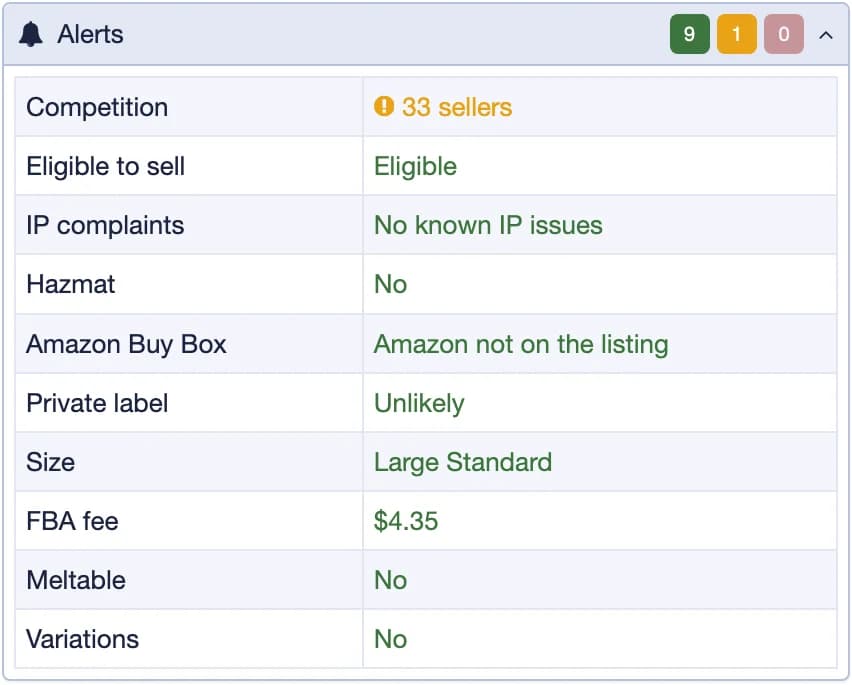
Every reason a product might not be worth it, in one place, the serious ones first.

  • Eligible to sell, Amazon Buy Box, Brand owner and IP complaints.
  • Hazmat, Dangerous Goods, Meltable, Private label, Size and FBA fee.
  • Competition, Buy Box suppressed and You own this.
  • The Alerts tile in Quick Info takes the color of the most serious one.
  • When you need approval, Request approval opens the application in your Seller Central.
Learn more
The extension's Alerts panel: eligible to sell, Amazon Buy Box, brand owner, IP complaints, hazmat, dangerous goods, meltable, private label, competition, size and FBA fee

Offers

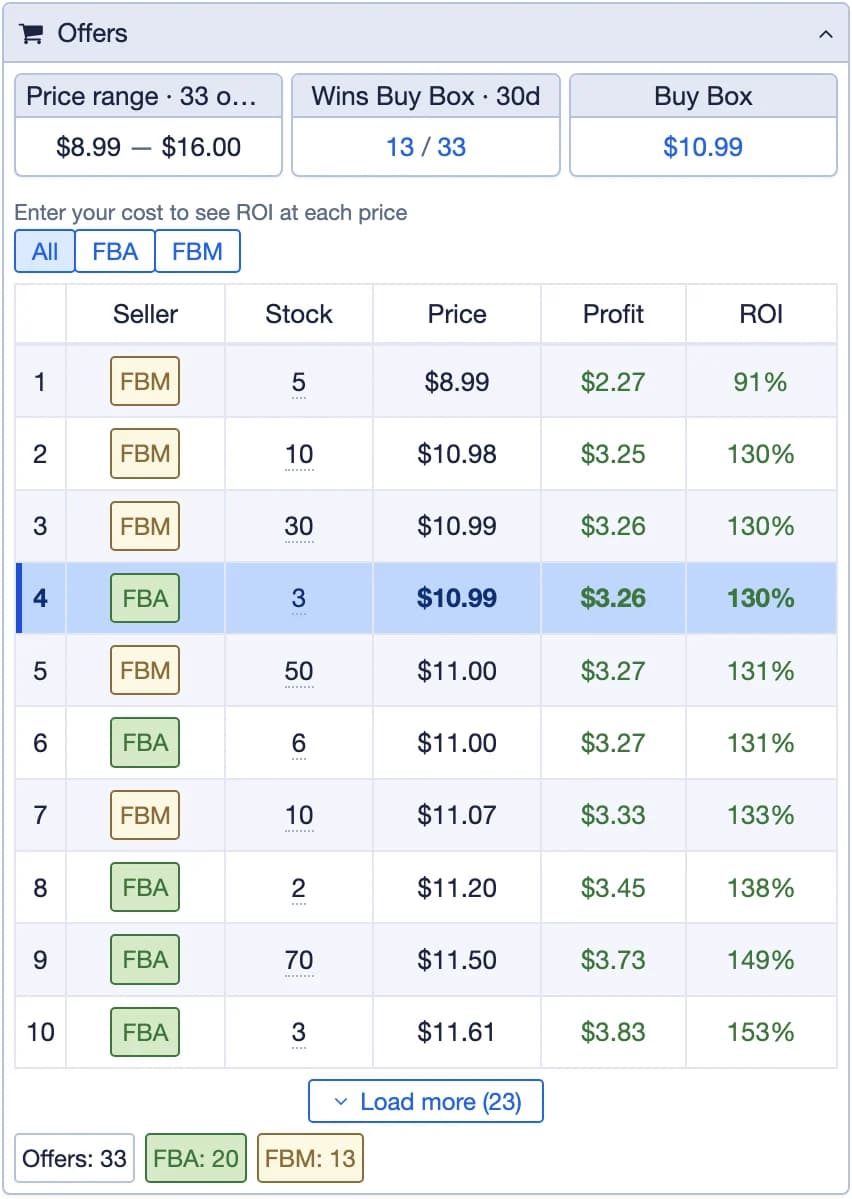
Every seller on the listing, with what they hold and what you would make at their price.

  • The Price range, who Wins Buy Box over 30 days, and the Buy Box price.
  • Each seller's Stock (up to 999+), their Price, and your Profit and ROI if you matched it.
  • All, FBA and FBM tabs, and a YOU badge on your own offer.
Learn more
The extension's Offers panel: the price range, who wins the Buy Box, and each seller with its fulfillment, stock, price, and your profit and ROI at that price

Real Share

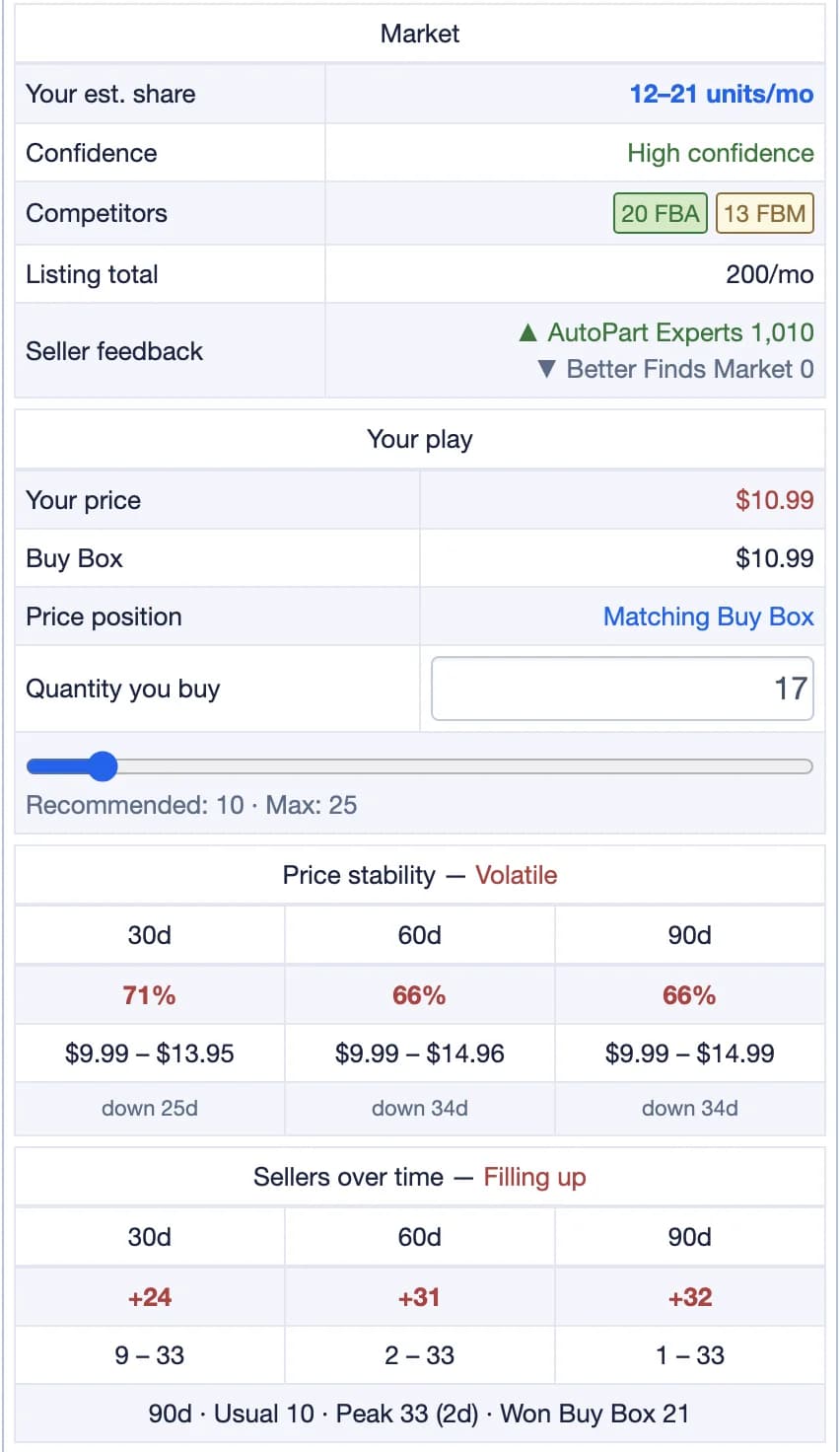
Est. Sales is what the whole listing sells. Real Share estimates what you can expect to sell alongside the other sellers. Only Plug Seller shows it.

  • Your est. share in units a month, with a Confidence level.
  • Competitors by FBA and FBM, the Listing total and the sellers' feedback.
  • Your play: your price against the Buy Box, your Price position, and how many units to buy.
  • Price stability over 30, 60 and 90 days.
Learn more
The Real Share part of the panel: your estimated share in units a month, the confidence, the competitors by FBA and FBM, the listing total, your play against the Buy Box with the quantity to buy, the price stability and the sellers over time

Profit Calculator

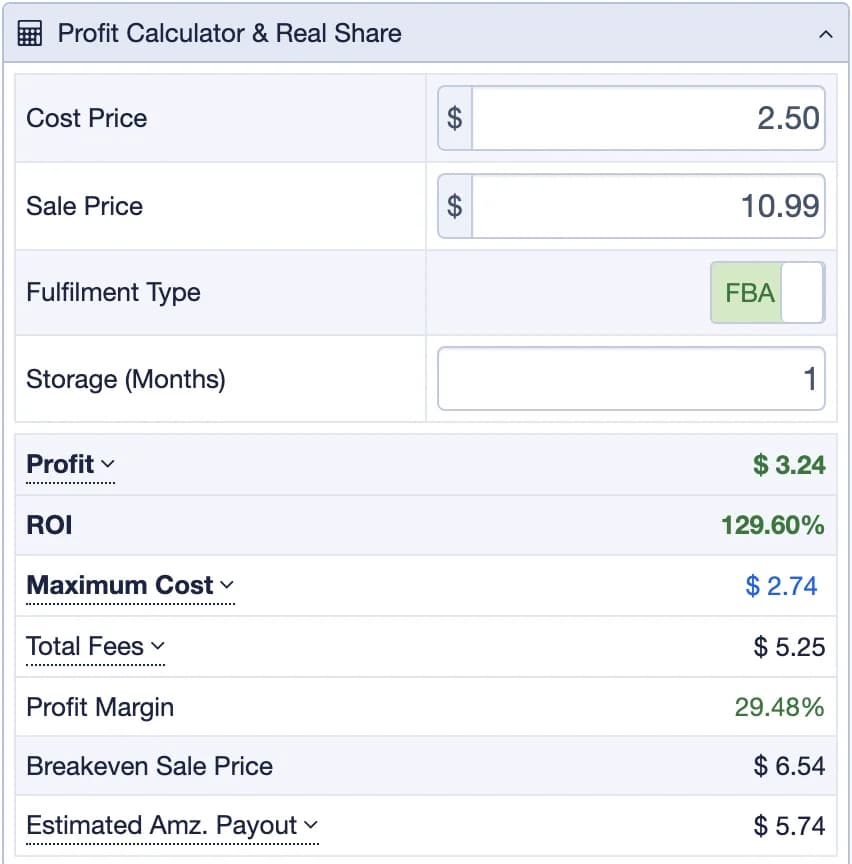
Try another cost or sale price and see what changes, fee by fee.

  • Enter your Cost Price, try another Sale Price and pick FBA or FBM.
  • Profit, ROI, Maximum Cost and Total Fees, with each fee listed when you click it.
  • Profit Margin, Breakeven Sale Price and Estimated Amz. Payout.
  • On FBM, Check shipping price gets a live rate.
Learn more
The Profit Calculator & Real Share panel: cost price, sale price, fulfillment type, storage months, profit, ROI, maximum cost, total fees, profit margin, breakeven sale price and estimated Amazon payout, then the market and your play

Charts

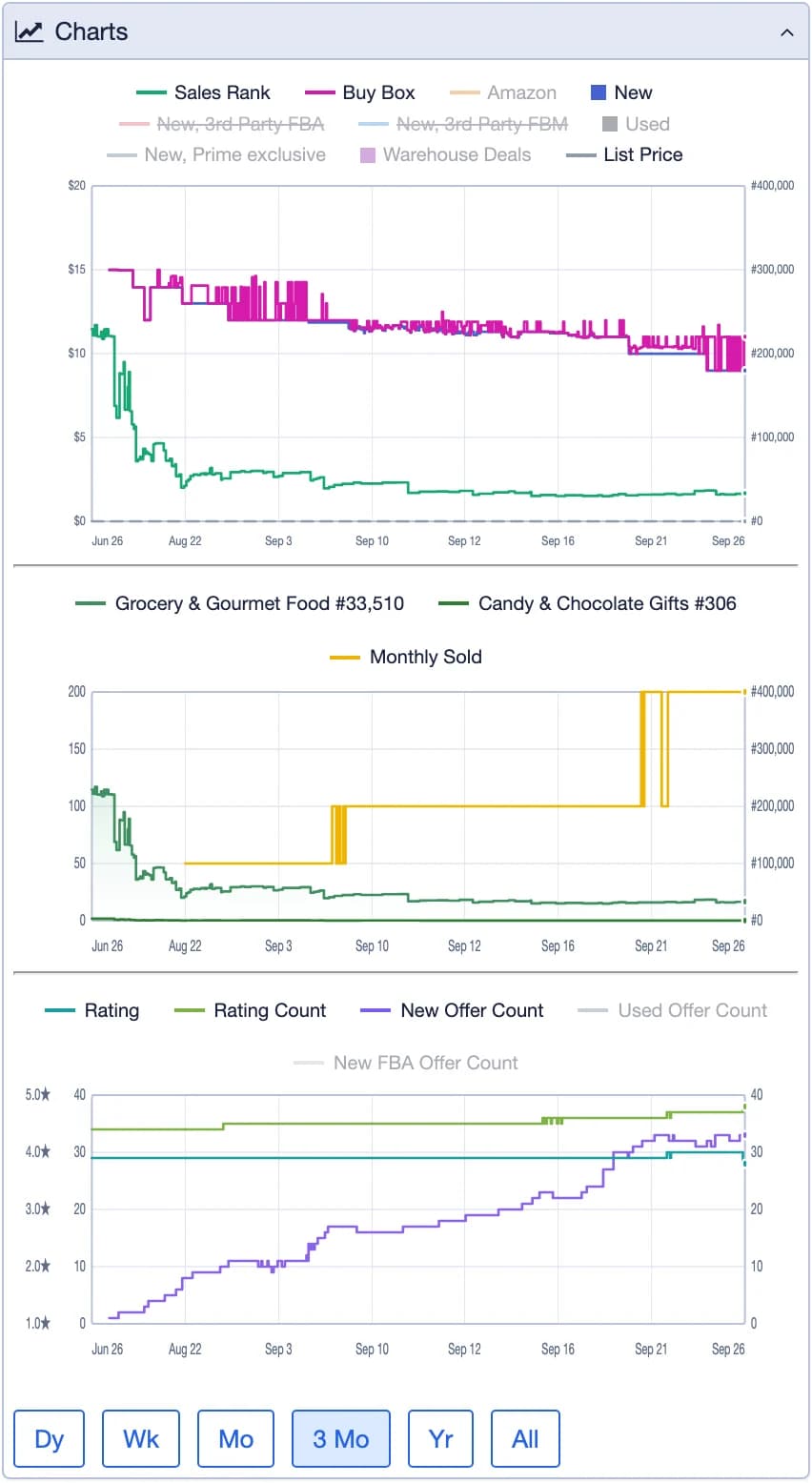
Price and rank history, on the same screen as the numbers.

  • Buy Box, Amazon, New and Used prices, and third-party FBA and FBM.
  • Sales Rank for the category and the subcategory, and Monthly Sold.
  • Rating, rating count and offer counts.
  • Dy, Wk, Mo, 3 Mo, Yr and All.
Learn more
The extension's Charts panel: Buy Box, Amazon and new prices with the sales rank, the category ranks with monthly sold, and the rating and offer counts, over 3 months

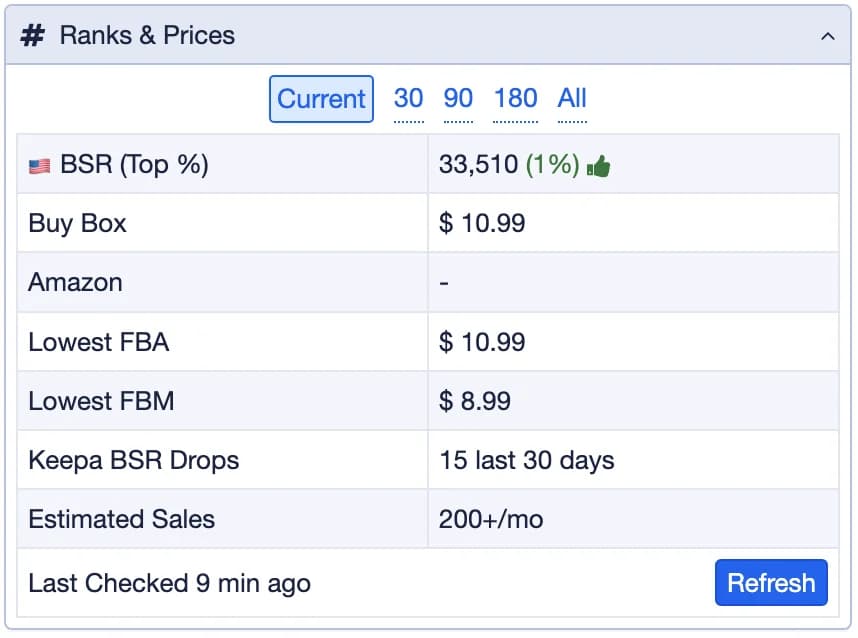
Ranks & Prices

The numbers behind the charts, for the period you pick.

  • The BSR (Top %) and the Buy Box, Amazon, Lowest FBA and Lowest FBM prices.
  • Rank drops and Estimated Sales.
  • Current, 30, 90 and 180 days, and All. Refresh reads it live again.
The extension's Ranks & Prices panel: the BSR, Buy Box, Amazon, lowest FBA and lowest FBM prices, the rank drops and the estimated sales for the current, 30, 90 and 180 day periods

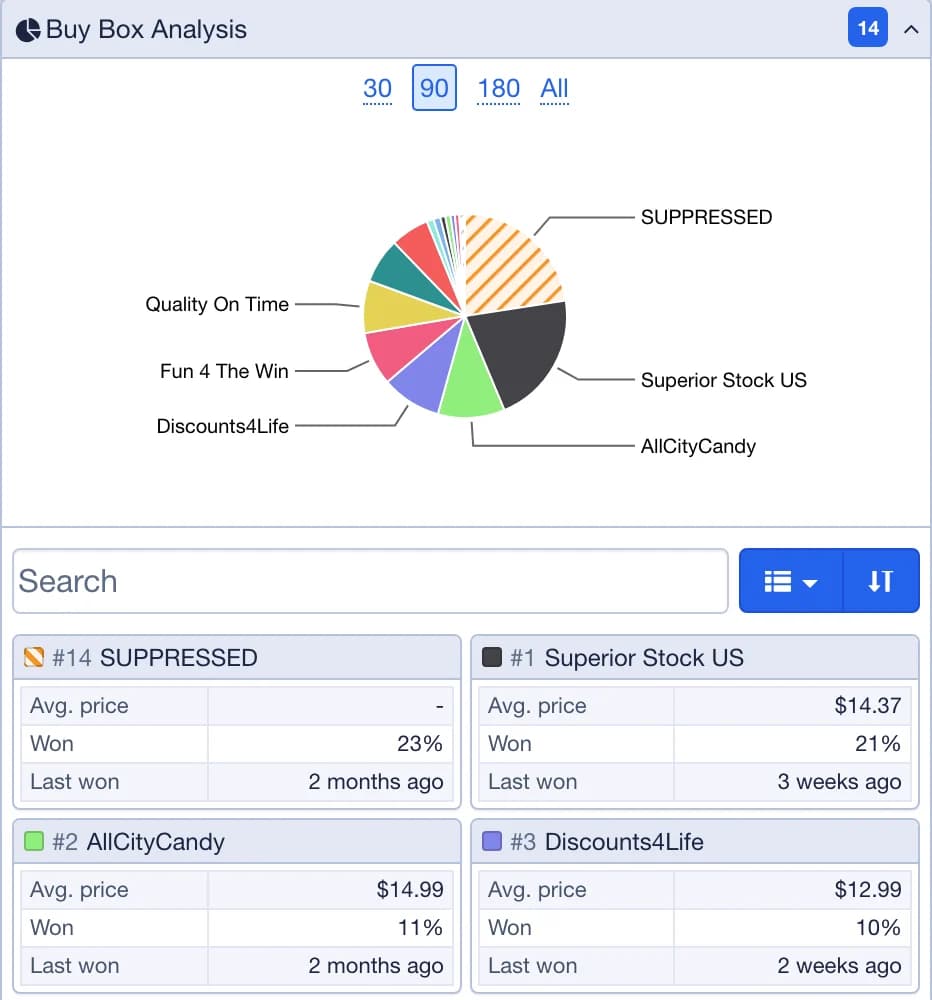
Buy Box Analysis

Who wins the Buy Box, and how often.

  • Each seller's share (Won) over 30, 90 or 180 days, or All.
  • Their Avg. price while they held it, and when they Last won it.
  • A trophy marks whoever holds it now.
Learn more
The Buy Box Analysis panel: the share of the Buy Box each seller won over 30, 90 and 180 days, as a pie chart and a table

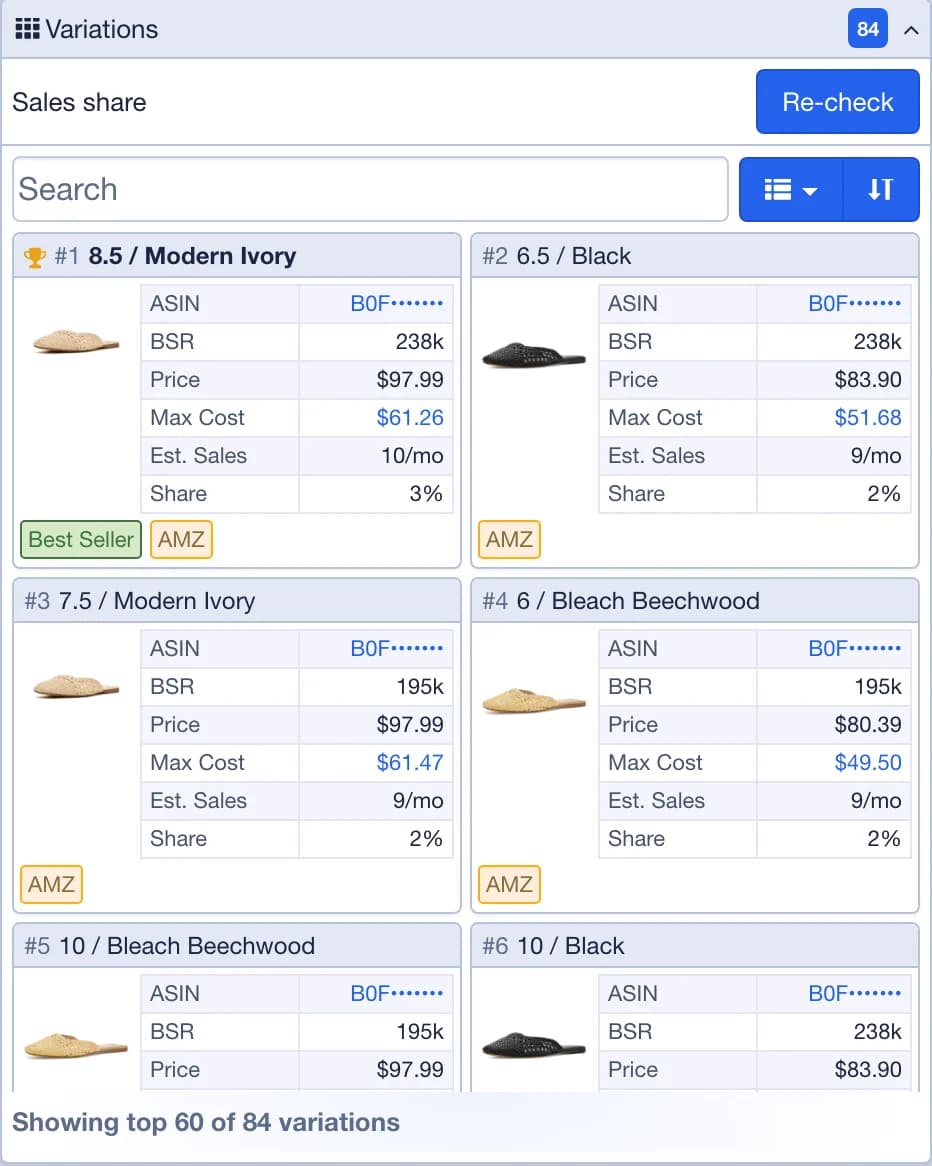
Variations

For a product that comes in sizes or colors, which one actually sells.

  • The rank, price and share of sales of each variation.
  • So you buy the one that moves, not the one that happens to be cheapest.
The Variations panel on a scan of a shoe with 84 variations: each size and color with its picture, ASIN, BSR, price, Max Cost, estimated sales and share of sales, the best seller first

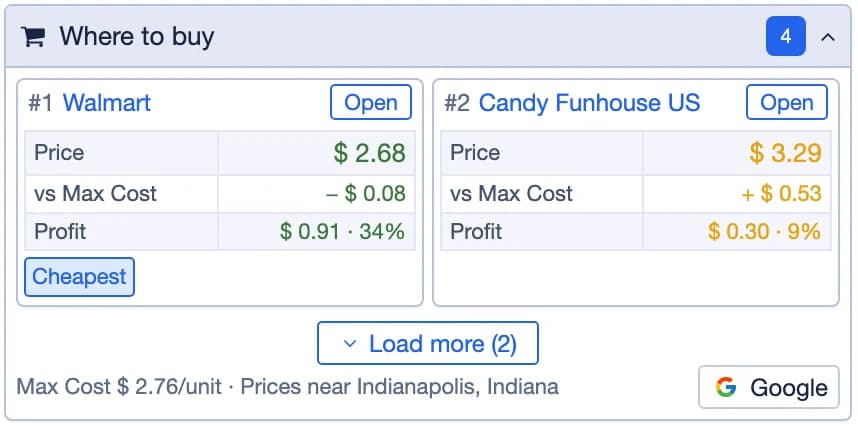
Where to buy

Stores selling the product for about your Max Cost or less, cheapest first.

  • Each store with its price, the pack size and your profit at that cost.
  • A store with Warning signs is flagged before you open it.
  • Add your ZIP for local prices adds stores near you.
  • Better Listing looks for another listing of the same product, like a bigger pack, priced per unit.

Included with Combo and Pro.

Learn more
The extension's Where to buy panel: stores selling the product at or under the Max Cost, cheapest first, each with its price and your profit

Notes, Tags & Google Sheets

Keep what you learn with the product, or send it to a sheet.

  • Up to 100 notes and 50 tags on a product, plus Add to Favorites. Filter your History by tag later.
  • Connect your Google account, pick a sheet and its columns, and Export adds any Amazon or Walmart scan as a row.
  • Up to 20 sheets, 60 columns each, with your own formulas.
Learn more
The extension's Notes & Tags panel: add a note, add tags and save the product to FavoritesThe extension's Google Sheets panel: the connected sheet, the source field and the Export button

Plug Keepa

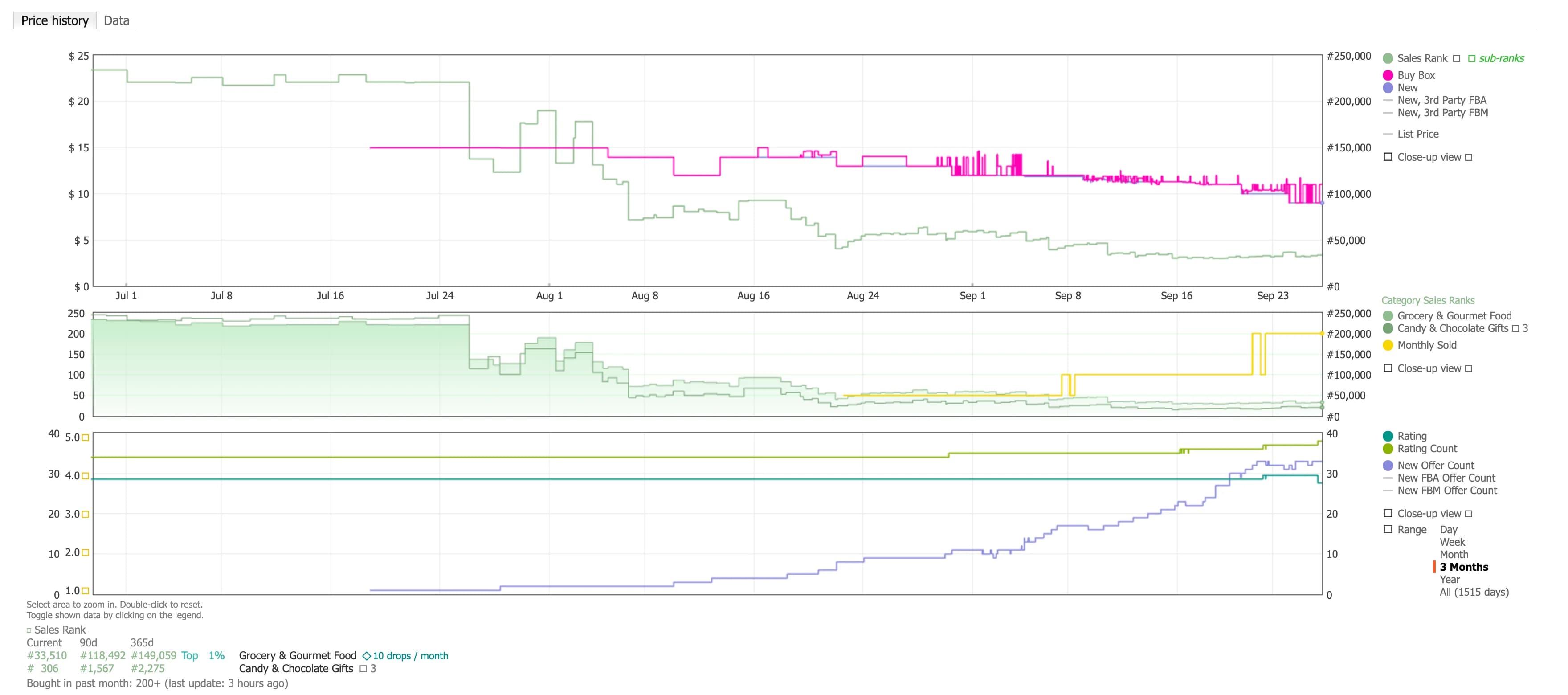
Price and sales rank history under the product, on Amazon and Walmart pages.

  • A box with Price history, Data and Variations tabs, right on the product page.
  • In the web app, the Keepa button on the product card opens the same box.

Included with Pro.

Learn more
Plug Keepa: the Price history tab with three months of Buy Box and new prices against the sales rank, the category sales ranks with monthly sold, the rating, rating count and offer counts, and the current, 90 day and 365 day ranks under the chart

History & Favorites

Every product you analyze, kept, on every device.

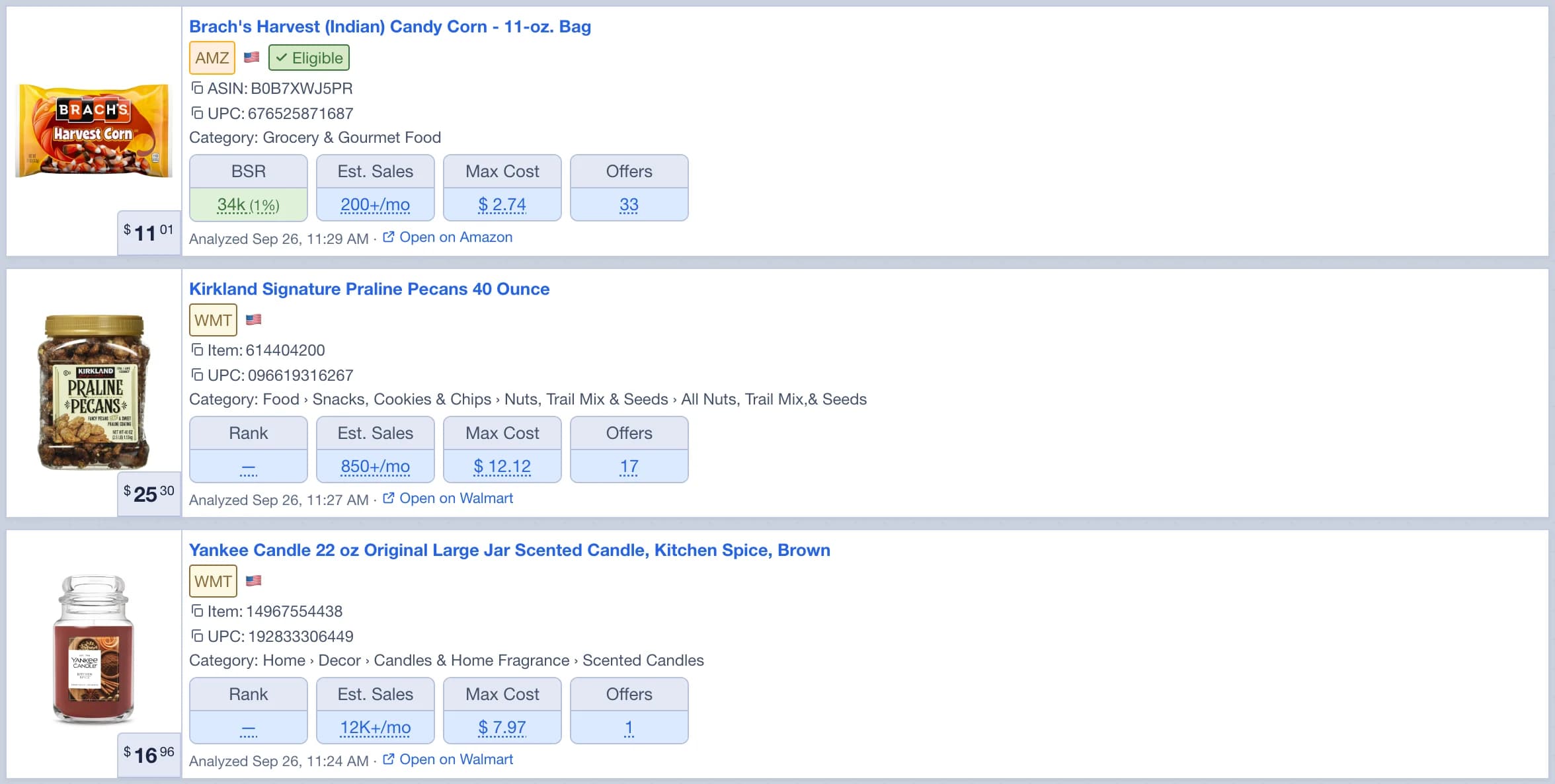
  • Your latest 1,000 scanned products across Amazon, Walmart and eBay, newest first.
  • Filter by marketplace, Favorites or tag. Search by name, ASIN or UPC.
  • The same list in the web app, the extension and the mobile app.
Learn more
The scan History: the latest scanned products on Amazon, Walmart and eBay, each with its rank, estimated sales, Max Cost and offers

Seller Settings

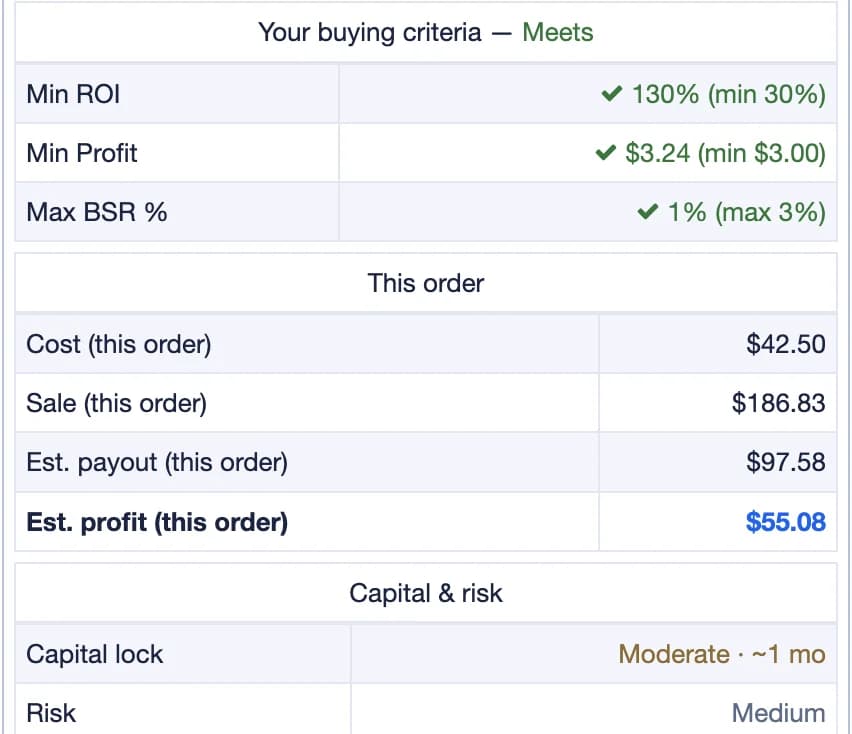
Tell Plug Seller your targets once, and every scan checks the product against them.

  • Minimum ROI, Minimum profit, Target ROI and Max BSR %.
  • Your Prep fee and Misc fee, added to every calculation.
  • Every scan then reads Meets or Fails against your numbers, and Max Cost follows them.
Learn more
Your buying criteria on a scan: Min ROI, Min Profit and Max BSR % each checked against your Seller Settings, then the cost, sale, payout and profit of this order, and the capital lock and risk

Eligibility on your account

Connect your Amazon store in Settings > Store Connect, free on every plan, and every scan asks Amazon, on your own account, whether you can list the product.

  • Yes means you can list it now. No means Amazon wants you to apply first. Restricted means it can't be sold on your account.
  • With your store connected, the fees on every scan are the fees Amazon quotes for your own account.
  • Plug Seller only reads Amazon's answer. It never submits anything for you.

Included with every plan.

Learn more
The Quick Info panel in the web app: Eligible, Alerts, BSR, estimated sales, Max Cost, cost and sale price, profit, profit %, ROI and breakeven, and the offer counts

Every scan answers the same three things: whether you can sell it, how fast it sells, and what it earns.

Try it for free

Walmart and eBay

Combo and Pro scan all three marketplaces. Starter Walmart scans Walmart, and Starter Amazon can add Walmart or eBay scanning to its plan.

Walmart analysis

Enter a keyword, a walmart.com link, an item ID or a UPC, or open the product with the extension.

  • Eligible comes from your own Walmart Seller Center, so it's the answer for your account.
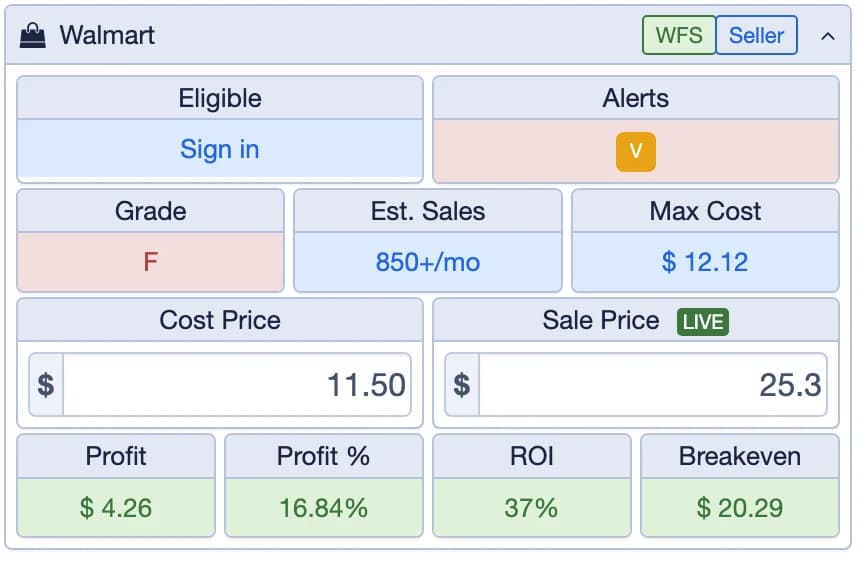
  • A WFS / Seller switch, Est. Sales and a Grade from A++ down to F.
  • Alerts for brand IP, Walmart selling it, competition, private label, stock and purchase limits.
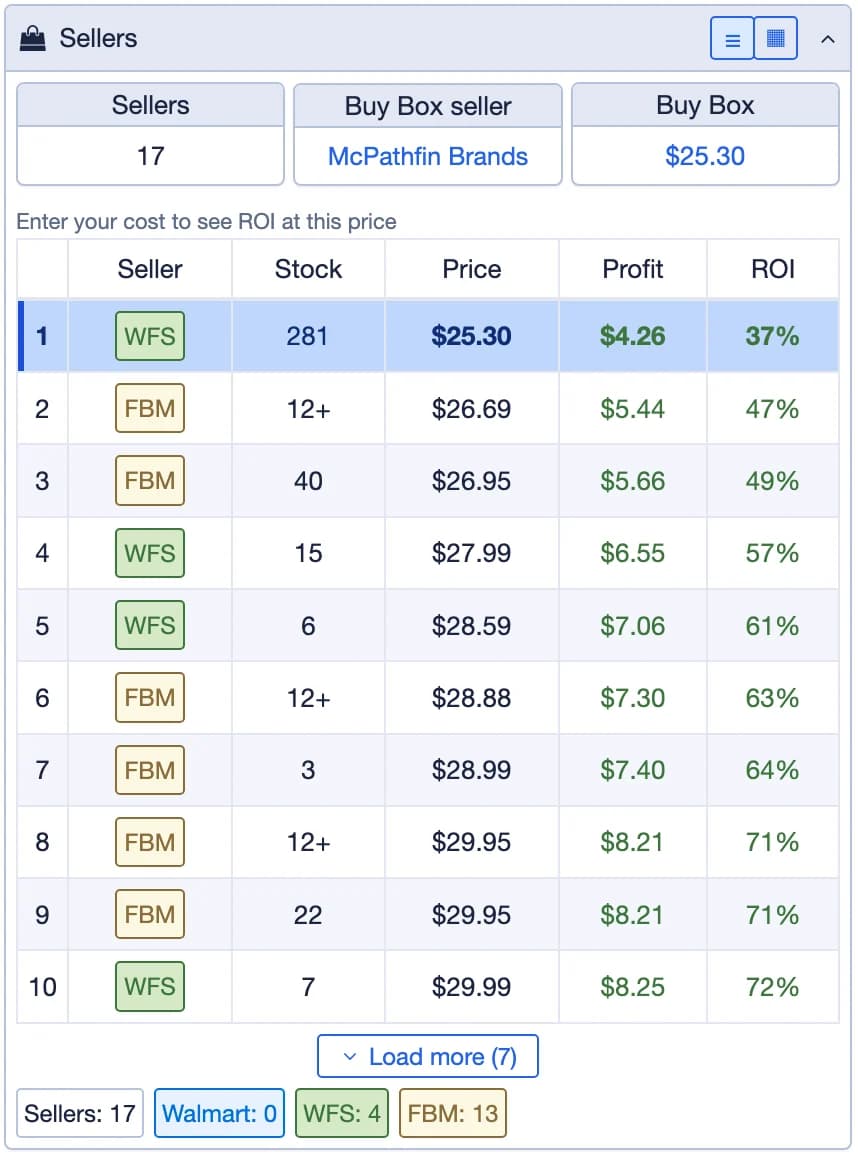
  • Sellers lists everyone on the listing with their stock, and Sell on Amazon works out the flip.
  • On Walmart's search and category pages, the extension puts a card on each product with its Max Cost, sales and price.
Learn more
The extension's Quick Info panel on a Walmart product: Eligible, Alerts, estimated sales, Max Cost, the WFS / Seller switch, cost and sale price, profit and ROI, and the gradeThe extension's Sellers panel on a Walmart product: every seller on the listing with its fulfillment, stock and price

eBay analysis

eBay has no sales rank, so Plug Seller works from what actually sold.

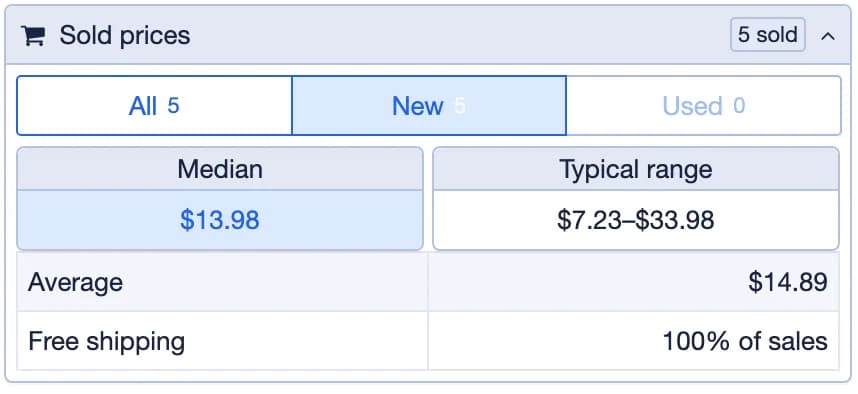
  • Sold Prices: the median, average and typical price, and the range. Price Trend over the last 90 days.
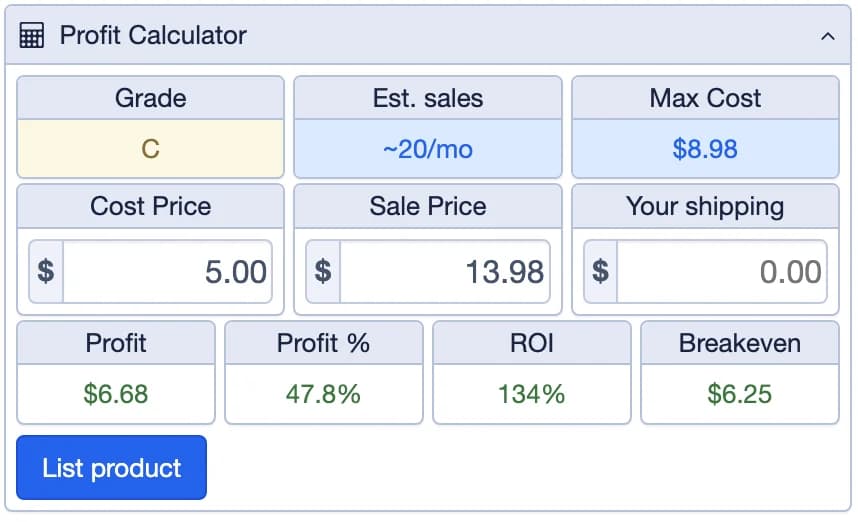
  • Fees & Max Cost, Net Profit, Margin, ROI and a Grade from A to F.
  • Sell-through, Est. days to sell and Months of supply.
  • Competition, vs Amazon for the same barcode, and the live listings.
  • List it on eBay from the scan: price, photos, a title and item specifics, then Publish.
Learn more
The extension's Sold prices panel on eBay: how many sold, the All, New and Used tabs, the median, the typical range, the average and the share with free shippingThe extension's eBay profit panel: fees and Max Cost, net profit, margin, ROI, breakeven, sell-through, estimated days to sell and months of supply

Run the business

Connect your stores and Plug Seller keeps your inventory, your sales and the profit after fees in one place. My Business is on Pro. Listing from a scan and shipping labels come with every paid plan.

List a product from a scan

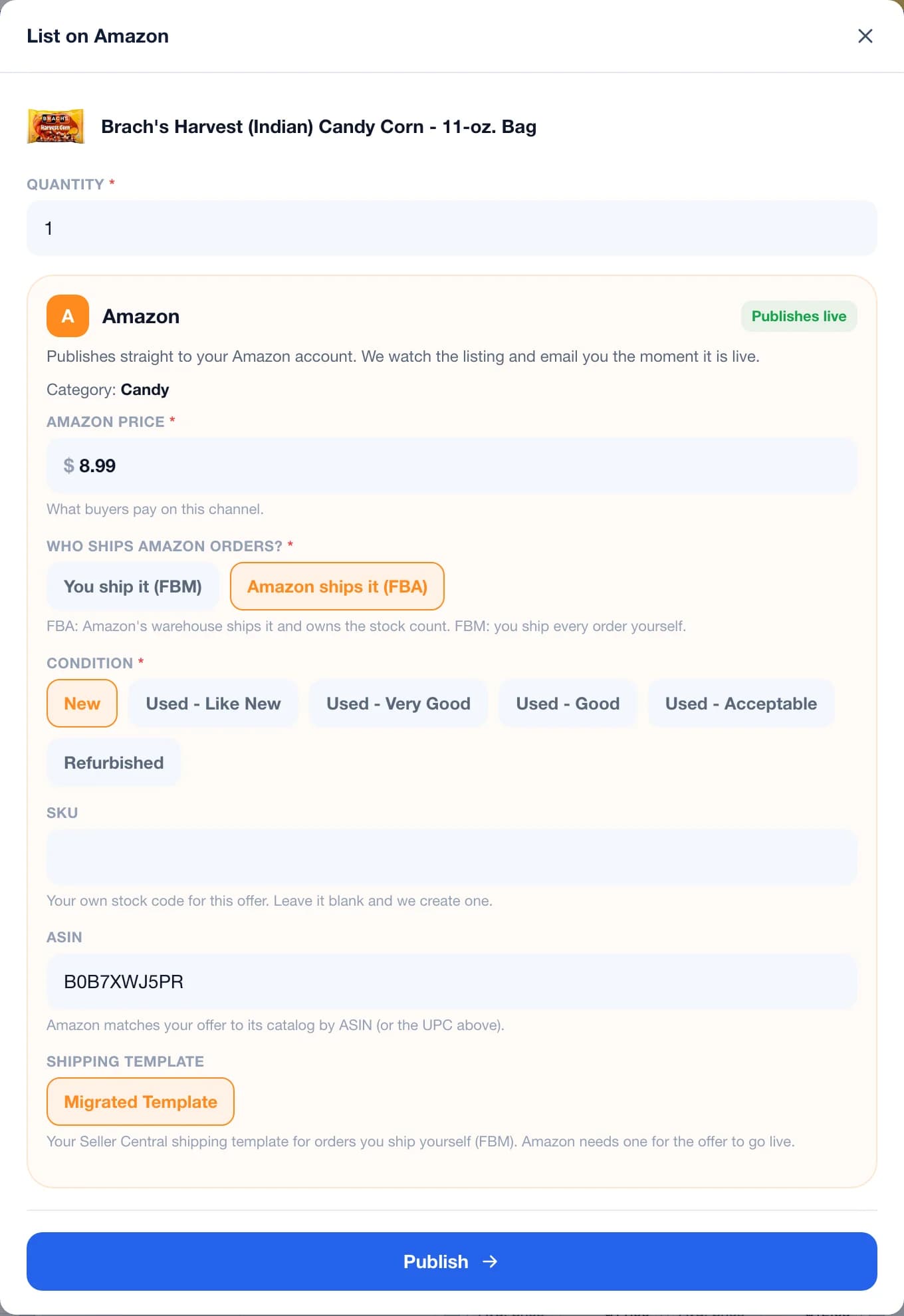
Press List product on a scan and fill in the form for that marketplace. The extension has the same button.

  • Amazon: the price, FBA or FBM, the condition, an optional SKU and your shipping template.
  • eBay: the price, photos, a title, item specifics, and the weight and size.
  • A badge tells you what to expect before you press Publish: Publishes live, Needs setup or Not eligible.
  • On Pro, Record purchase saves your cost first, so the sale counts toward your profit.

Included with every paid plan.

Learn more
The List on Amazon form opened from a scan: the quantity, the Amazon price, who ships the orders (FBM or FBA), the condition, the SKU, the ASIN, the shipping template and the Publish button

My Business

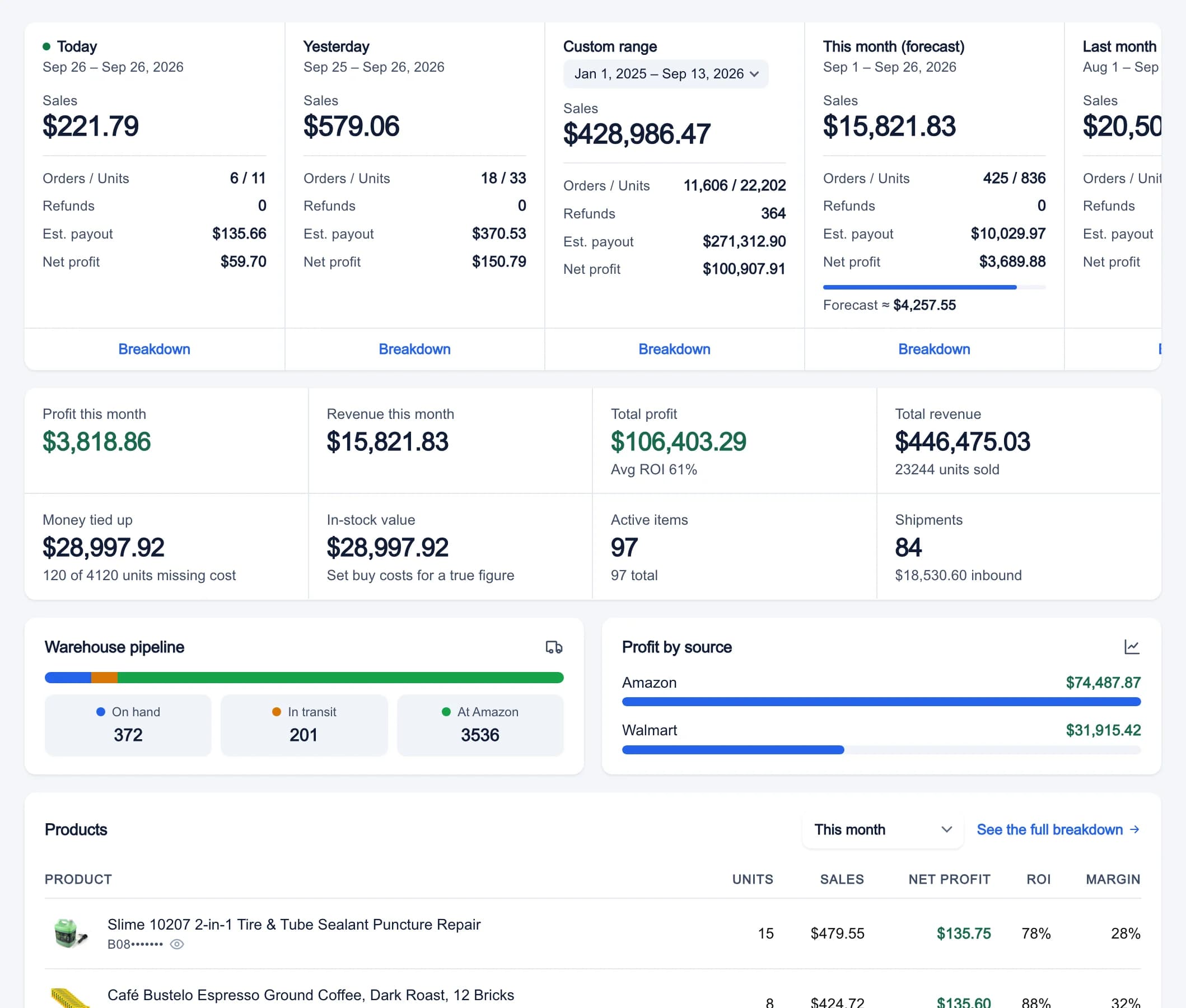
One inventory across Amazon, Walmart and eBay, with your sales, your orders and the profit after fees. Pick All, Amazon, Walmart or eBay at the top.

  • Connecting Amazon imports your catalog, your stock and up to 24 months of sales.
  • Today, Yesterday, This month and a Custom range, each with its Breakdown.
  • When a product sells on one marketplace, the stock goes down everywhere else.
  • Dashboard, Inventory, Shipments, Sales, Orders, P&L, Expenses, Cashflow, Reports, Purchases, Suppliers, Repricer and Reimbursements.
  • The same numbers in the mobile app's Business tab.

Included with Pro.

Learn more
The My Business dashboard: sales, orders, refunds and net profit for today, yesterday, a custom range, this month and last month, then profit and revenue, money tied up, in-stock value, active items and shipments, the warehouse pipeline and profit by source

Inventory

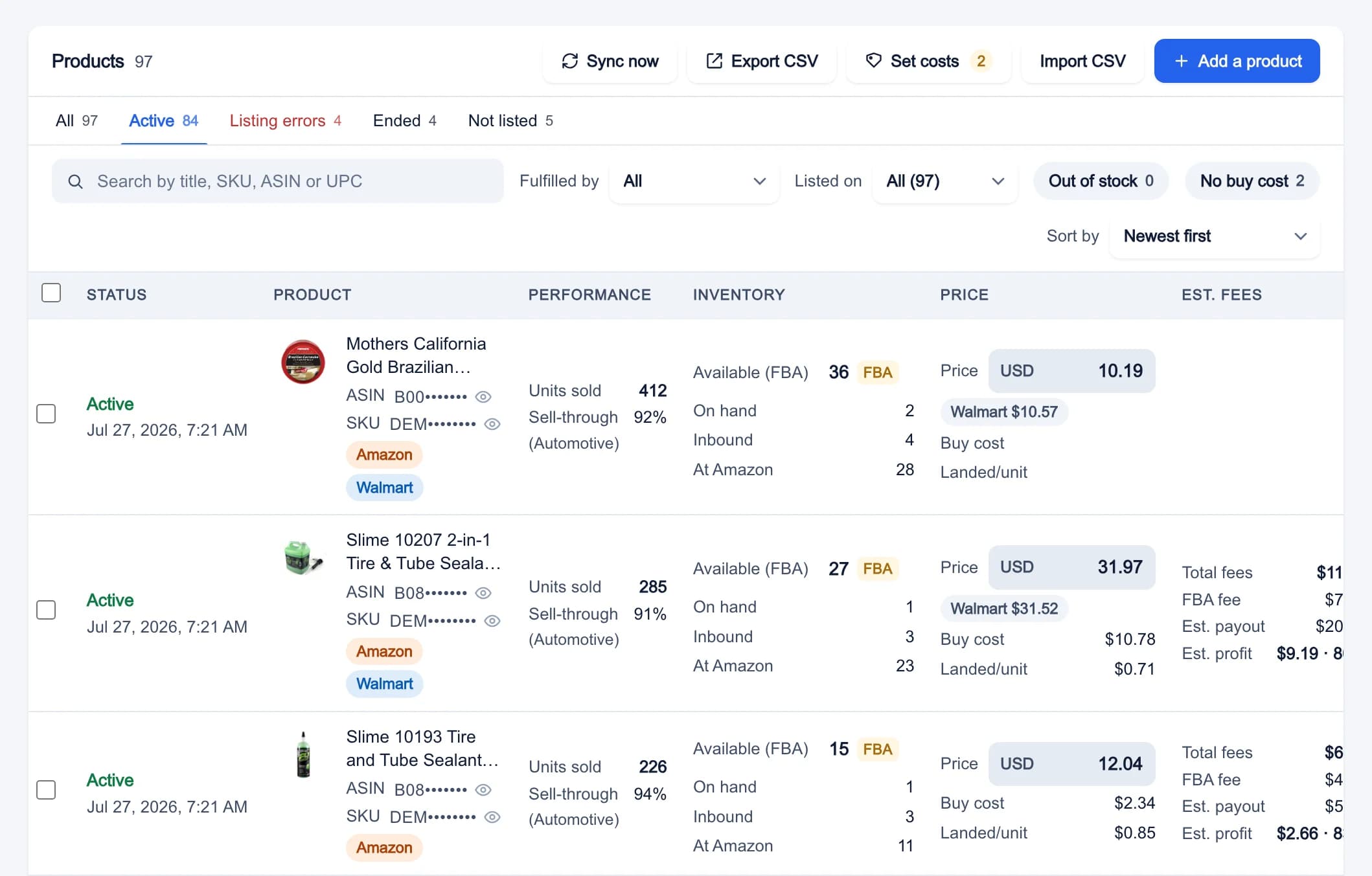
Every product you sell, with what's on hand, in transit and at Amazon.

  • Active, Listing errors, Ended and Not listed, with a search by title, SKU, ASIN or UPC.
  • Available, Inbound and Reserved units, your buy cost and the landed cost.
  • The fees and the profit per unit on each marketplace, and a Sync now button.
  • Add a product lists one product on several marketplaces at once.

Included with Pro.

Learn more
Inventory in My Business: every product with its status, available, inbound and reserved units, the price on each marketplace and the estimated fees and profit

Purchases & suppliers

My Business works out your profit from what you paid, so it needs your costs. Recording a purchase saves them with the product.

  • Record a purchase from a scan: the cost per unit, the quantity, the supplier and where you bought it.
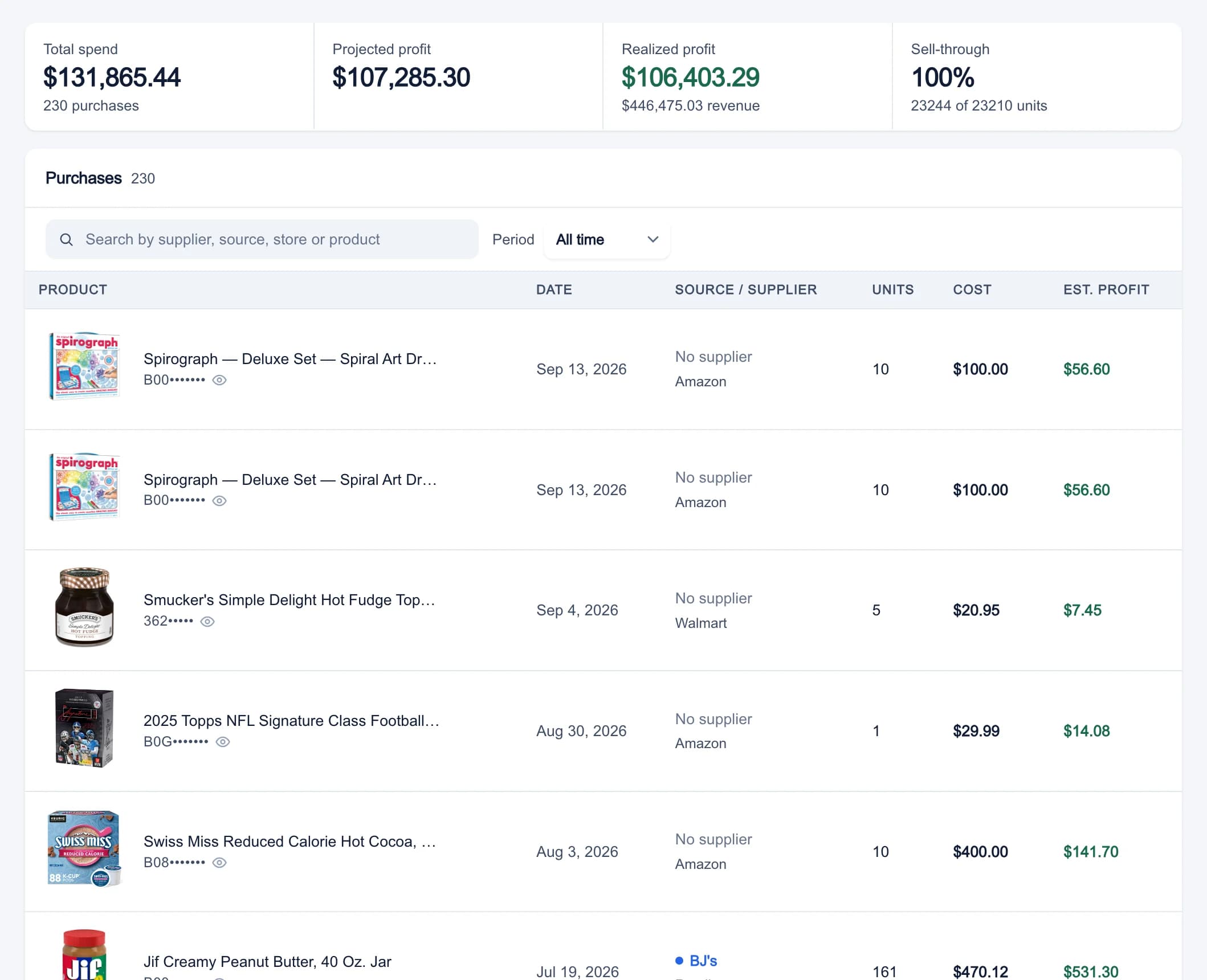
  • Total spend, Projected profit, Realized profit and Sell-through, searchable by supplier, store or product.
  • Suppliers keeps every store and vendor you buy from, with its spend, units and realized ROI.
  • A purchase order follows a wholesale order from Draft to Ordered, Received and Closed, freight included.

Included with Pro.

Learn more
Purchases in My Business: total spend, projected profit, realized profit and sell-through, then each purchase with its date, supplier, units, cost and estimated profit

Receipts & expenses

Keep every receipt, and let it fill in what you paid.

  • Take a photo or upload a receipt or invoice. Plug Seller keeps the original and reads the store, the date, the totals and each line.
  • Apply costs sets the buy cost on the matching items in your inventory. Record as purchase adds the lines as one purchase.
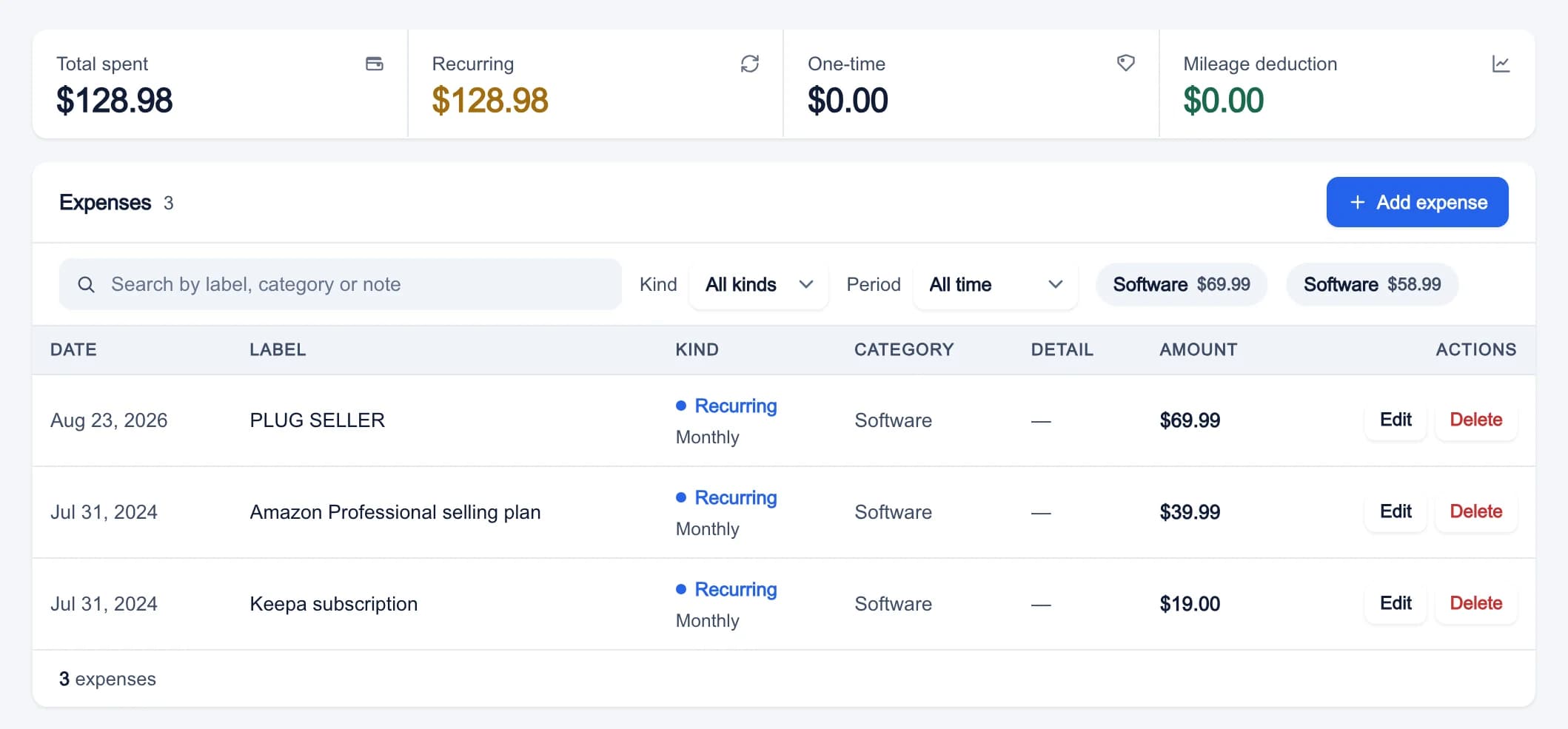
  • Expenses takes one-time costs, monthly or yearly subscriptions, and mileage at the IRS rate.
  • Everything comes off your net profit in the P&L, one line per category.

Included with Pro.

Learn more
Expenses in My Business: total spent, recurring and one-time totals, mileage, and the list of expenses with their category and amount

P&L and reports

Your profit the way an accountant would lay it out, for the marketplace you pick.

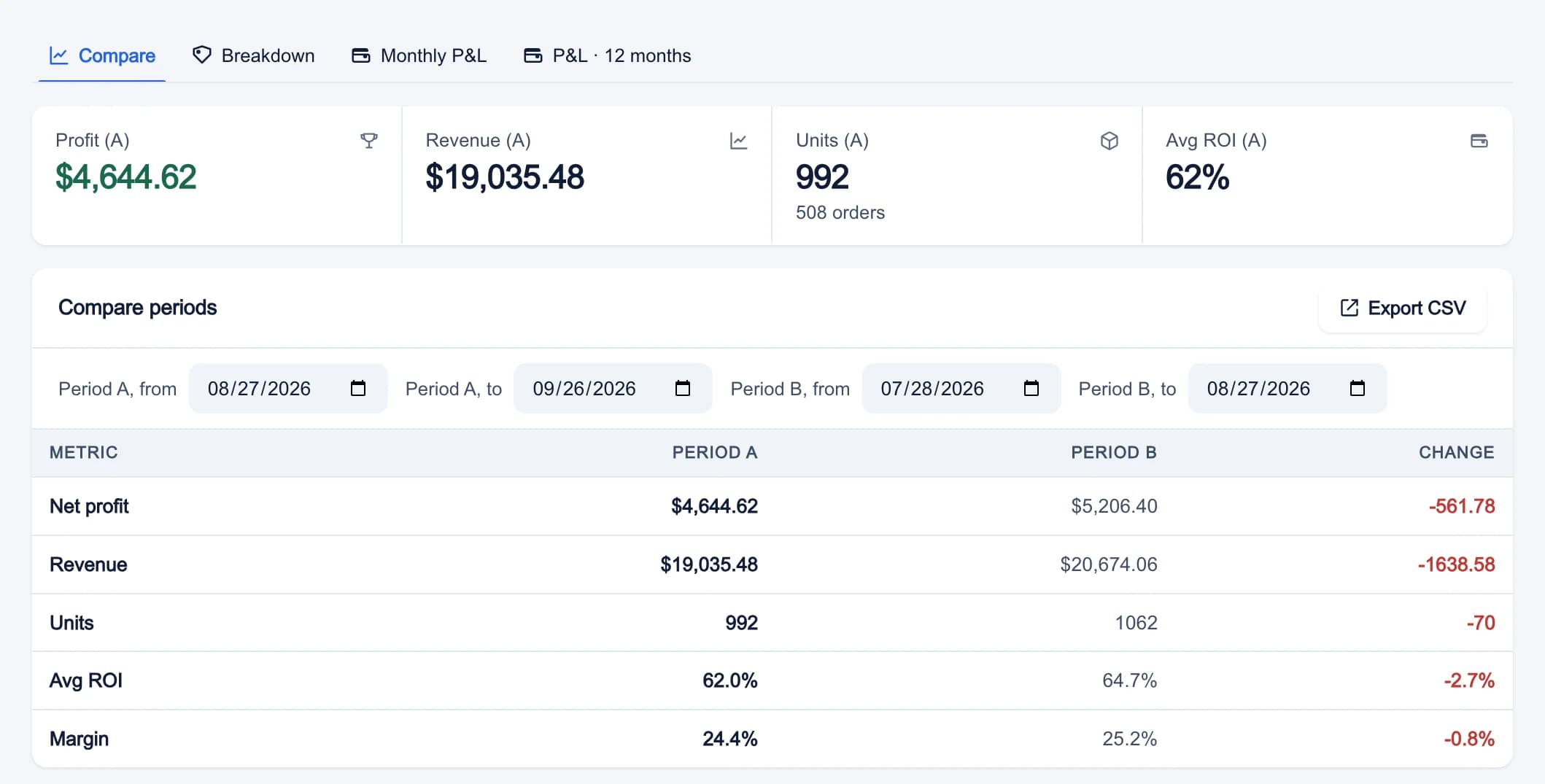
  • Compare puts two periods side by side: net profit, revenue, units, average ROI and margin.
  • Breakdown groups your profit by product, marketplace, category, source or supplier.
  • Monthly P&L and P&L · 12 months, as income statements.
  • Reports for product trends, traffic and conversion, returns and sales by state, and CSV exports for tax time.

Included with Pro.

Learn more
Profit & Loss in My Business: the Compare tab with two periods side by side, net profit, revenue, units, average ROI and margin, and the change between them

Money Back

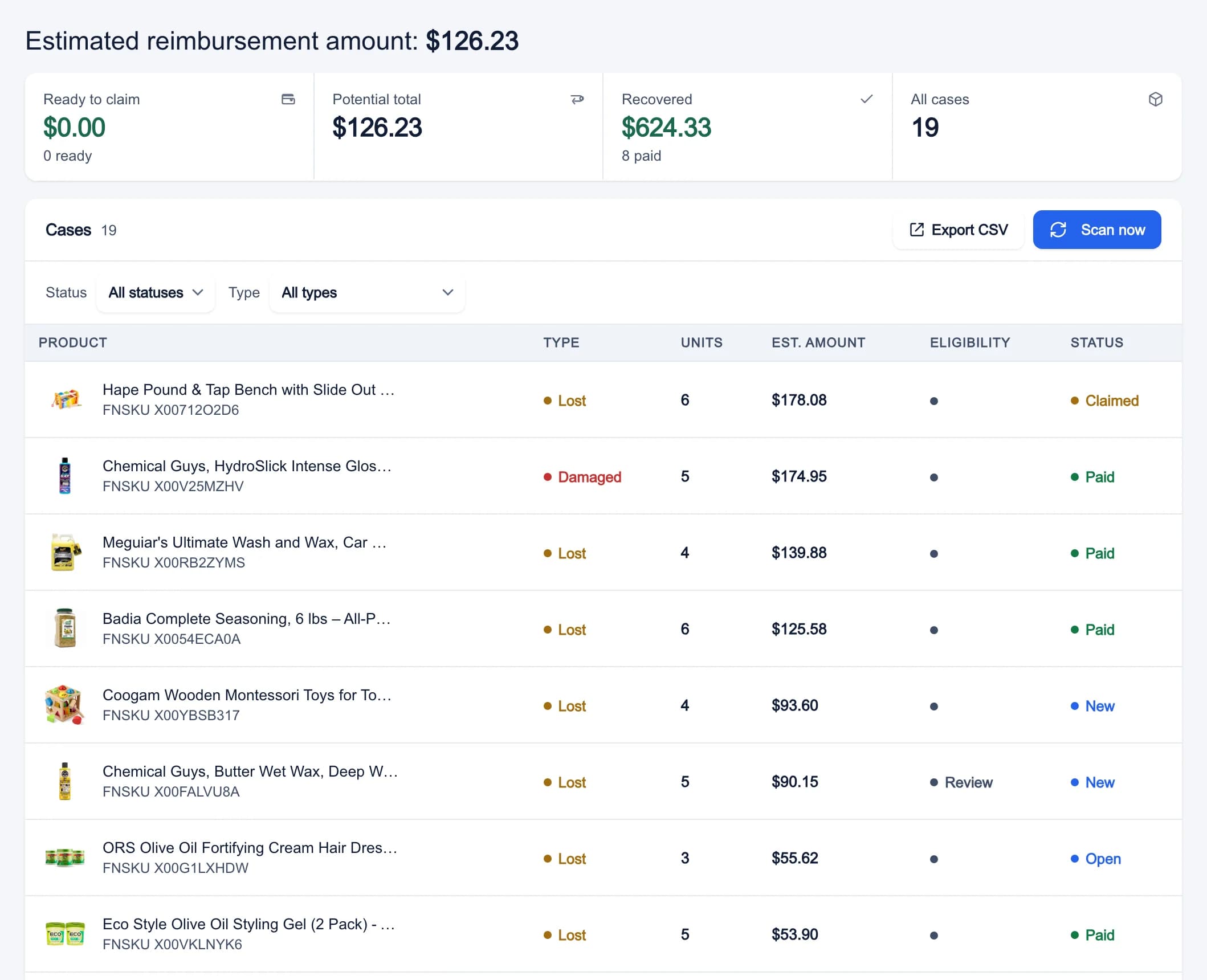
Money Back goes through your Amazon reports for the last 180 days and finds what Amazon owes you.

  • Lost or damaged units, shipments received short, returns that came back damaged, refunds never sent back, and reimbursements paid below your cost.
  • Money Amazon has already paid you is taken off.
  • Each case comes with the evidence and a written Claim text. Copy claim, then Open in Seller Central to file.
  • Mark claimed and Mark paid keep track of each case. We never file a claim for you.

Included with Pro.

Learn more
Money Back in My Business: the estimated reimbursement amount, the cases ready to claim, the potential total and what was recovered, then each case with its type, units, estimated amount and status

Repricer

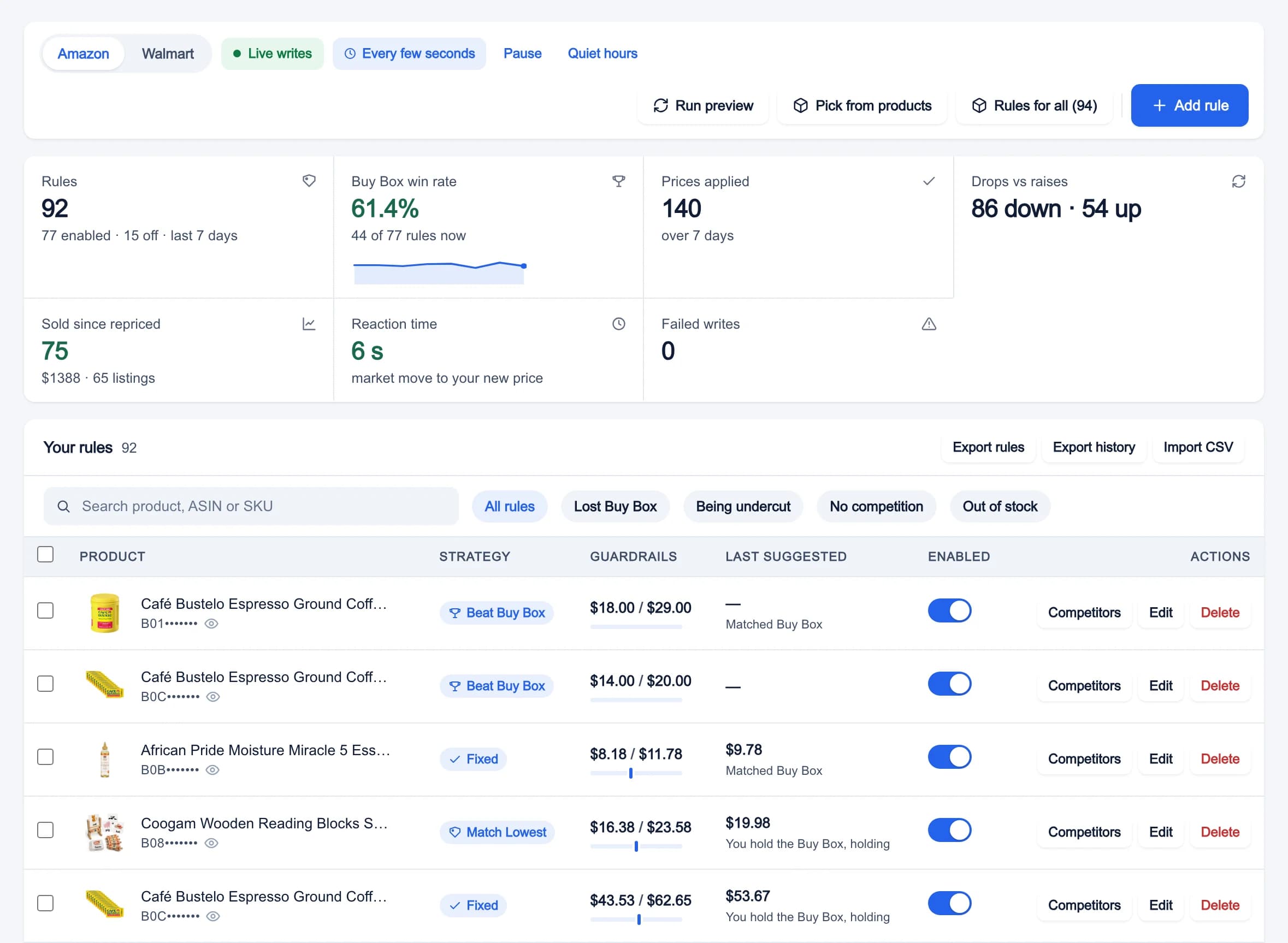
The repricer moves your price to compete for the Buy Box, always between the minimum and maximum you set.

  • Six strategies: Beat Buy Box, Match Buy Box, Beat Lowest, Match Lowest, Premium and Fixed.
  • A Min price and Max price on every rule, plus your Cost, a Min ROI % and a Min profit $ it never goes under.
  • Quiet hours, and a pause after each change so it never spirals down.
  • Run preview before Live writes, and Pause whenever you want.

Included with Pro.

Learn more
The repricer in My Business: rules, Buy Box win rate, prices applied, the reaction time, and each listing with its strategy, guardrails, last suggested price and an enabled switch

Shipping labels

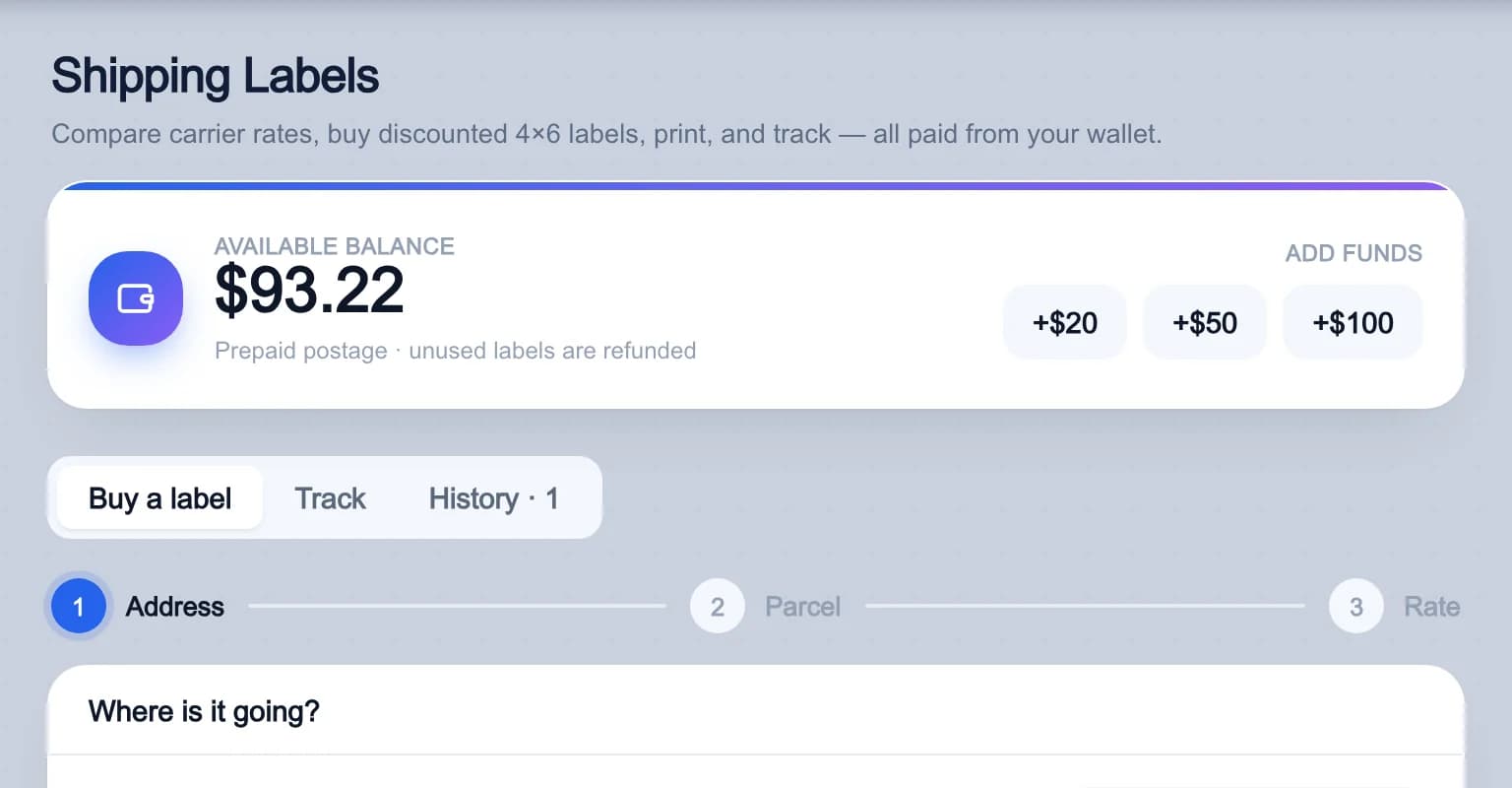
Buy discounted labels from More > Shipping Labels and print them at home on a 4x6 label.

  • Enter the address and the package, press Get rates, and compare the carriers.
  • Labels are paid from a prepaid wallet you top up by card. Refund a label you didn't use.
  • Track USPS, UPS, FedEx and DHL Express packages, and Schedule pickup.
  • In the mobile app, order free boxes and envelopes from USPS or UPS.

Included with every paid plan.

Learn more
Shipping Labels: the prepaid wallet balance with top-up buttons, the Buy a label, Track and History tabs, and the first step of a new label

Your team

A paid Pro plan comes with 3 team seats. Invite someone from Settings > Team and they sign in with their own email and password, use every Pro feature, and keep their own data. Team members never need a card.

Learn more
Your devices

Phones, web browsers and Chrome extensions are counted separately: 2 of each on Starter, 3 on Combo and 5 on Pro. See them all in Settings > Devices, and remove one there when you change phones or computers.

Learn more
See how to use each feature

The Help Center has a written guide for every tool on this page, and the tutorials page has short videos. You do not need to sign in for either.

Try every tool
on a 3-day free trial.

Pick a plan and add a card. You are not charged during the trial, and you can cancel anytime.